Scoot
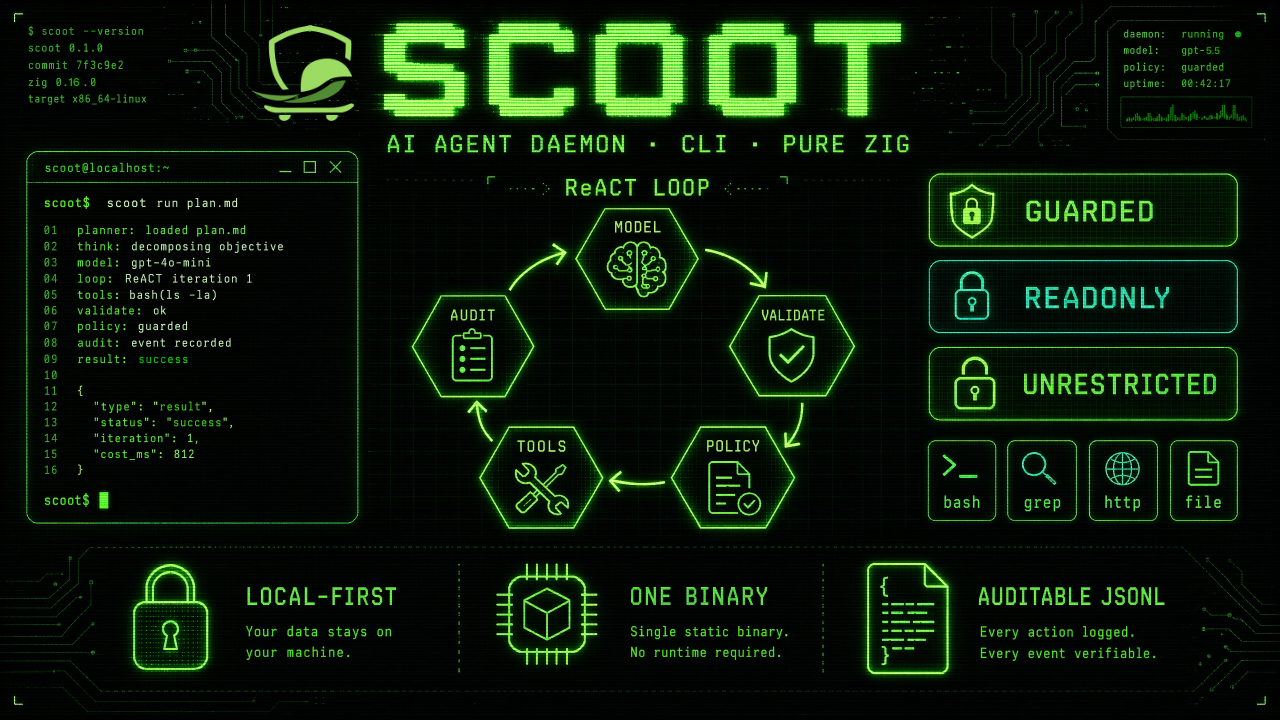
Scoot is a lightweight, local-first AI agent daemon and CLI written in pure Zig. It drives an OpenAI-compatible model backend through a defensive ReACT loop, validates every structured step the model produces, runs local tools behind execution-policy gates, and records each step as auditable local state.
It is built for plain-text environments — servers, containers, CI runners, embedded Linux — where you want an automatable agent that is small, predictable, and fully inspectable, with no GUI, no cloud sync, and no plaintext secrets.
How It Works
Every turn runs the same defensive loop:
- Ask the model for exactly one structured step (
thought+action+action_input). - Validate the step against a strict JSON schema (never execute free-form text).
- Gate the action through the active execution policy (
guarded/readonly/unrestricted). - Run the selected built-in tool inside a sandbox with a hard timeout.
- Audit the action and write it to the session transcript and audit log.
- Observe — feed the tool’s output back to the model as the next observation.
The loop repeats until the model emits a final answer or hits max_turns.
Core Capabilities
- Two entry points — one-shot
scoot -e "<goal>"and an interactive REPL. - Twelve built-in actions —
bash,file_read,file_write,file_edit,grep,glob,outline,http_request,skill,recall,parallel, andfinal. The structured tools work without external commands, so they behave identically on stripped-down systems. See Built-in Tools. - Three execution policies —
guarded(interactive tripwire with default write-confinement and SSRF guard),readonly(fail-closed), andunrestricted(audited but unlimited). See Execution Policy & Security. - Local skills with progressive disclosure — task-specific instruction packs
discovered from the project and user directories, read through a native,
read-only
skillaction. See Skills. - Scheduling & daemon mode — unattended jobs that always run with
fail-closed
readonlysafety unless you opt into more. See Scheduling & Daemon. - Auditable state — sessions and audit events persisted as append-only JSONL. See Sessions & Audit.
- Flexible config & secrets — TOML first, JSON fallback, secrets loaded from
an env var, a
0600token file, or a credential command — never inline. See Configuration.
Quick Start
# 1. Build (Zig 0.16+).
zig build
zig build test

# 2. Point Scoot at a backend (defaults to a local Ollama-compatible endpoint).
export OPENAI_API_KEY="sk-..."          # only if your backend needs a key

# 3. Inspect the resolved runtime and health.
./zig-out/bin/scoot config
./zig-out/bin/scoot doctor

# 4. Run a one-shot goal, or start the REPL.
./zig-out/bin/scoot -e "count the Zig source files in this repository"
./zig-out/bin/scoot            # interactive REPL; /exit to leave
New to Scoot? Read Installation → Configuration → CLI Reference. Want to understand what the agent can do? See Built-in Tools and Execution Policy & Security.
Runtime Directory
Scoot keeps everything under ~/.scoot by default. Override it with the
--scoot-home flag or the SCOOT_HOME environment variable (the flag wins).
~/.scoot/
  config.toml      # configuration (config.json is the fallback)
  token            # optional 0600 API token file
  skills/          # user-level skills
  logs/            # audit / run logs (audit.jsonl)
  state/           # sessions, daemon lifecycle, scheduler state
Start from config.example.toml — copy it to
~/.scoot/config.toml and edit.
Design Principles
Scoot is intentionally conservative. These are non-negotiable boundaries, not preferences:
- local-first runtime state, one small binary, no GUI;
- OpenAI-compatible backends only — no provider-specific protocol sprawl;
- no plaintext secrets in committed config, logs, or audit output;
- no execution of unvalidated model output;
- skills add instructions and data, never a privileged execution path.
See the Roadmap and Agent Guide for the full set of rules that govern how Scoot evolves.
Installation
Scoot is distributed as a single self-contained binary. You can build it from source or download a tagged release artifact.
Requirements
- Zig 0.16.0 or newer to build from source. No other build dependency.
- A reachable OpenAI-compatible Responses API (
/v1/responses) backend (local or remote). - A POSIX shell (
/bin/sh) for thebashtool. The structured tools (file_read,grep,glob,http_request, …) need no external commands.
Supported release targets: linux-amd64, linux-arm64, linux-armv7,
macos-amd64, macos-arm64.
Install Latest Release
The install script detects your host OS/CPU, downloads the matching latest
release archive plus its .sha256 file, verifies the checksum, and installs the
scoot binary.
curl -fsSL https://raw.githubusercontent.com/scootship/scoot/main/install.sh | sh
By default it installs to /usr/local/bin and uses sudo if needed. To install
without sudo, choose a user-writable directory that is on your PATH:
curl -fsSL https://raw.githubusercontent.com/scootship/scoot/main/install.sh | env SCOOT_INSTALL_DIR="$HOME/.local/bin" sh
Pin a specific release when reproducibility matters:
curl -fsSL https://raw.githubusercontent.com/scootship/scoot/main/install.sh | env SCOOT_INSTALL_VERSION=v0.2.0 sh
Supported installer environment variables:
| Variable | Default | Purpose |
|---|---|---|
SCOOT_INSTALL_DIR | /usr/local/bin | Destination directory for the binary. |
SCOOT_INSTALL_VERSION | latest | Release tag to install, with or without leading v. |
SCOOT_INSTALL_BINARY | scoot | Installed binary name. |
SCOOT_INSTALL_REPO | scootship/scoot | GitHub repository to download from. |
SCOOT_INSTALL_EDGE | unset (opt-in) | Set to any non-empty value to also download and install the optional scoot-edge fleet companion as $SCOOT_INSTALL_DIR/scoot-edge. Never installed unless explicitly requested. |
Install With Homebrew (macOS)
A Homebrew tap publishes formulae for macOS:
brew install scootship/tap/scoot
To also run compute-only Wasm tool packages (the wasm_tool action), install the
optional standalone host. Its formula depends on scoot, so this single command
installs both the agent and the host:
brew install scootship/tap/scoot-wasm
To also observe/dispatch to this Scoot from a management center, install the
optional standalone fleet companion. Its formula likewise depends on scoot,
since scoot-edge launches the agent as a subprocess:
brew install scootship/tap/scoot-edge
All three land on Homebrew’s bin (on your PATH), so the default
wasm_host = ["scoot-wasm", "wasi", "{component}"] resolves scoot-wasm from
PATH with no extra configuration, and scoot-edge finds scoot on PATH by
default too (override with --scoot-bin). The core scoot formula never pulls
in either optional companion, keeping the default install minimal.
Install via apt (Debian/Ubuntu)
scoot, the optional scoot-wasm host, and the optional scoot-edge fleet
companion are all published to a shared apt repository,
scootship/apt-tap, for the amd64,
arm64, and armhf architectures. Add the repository once:
curl -fsSL https://scootship.github.io/apt-tap/pubkey.gpg | sudo gpg --dearmor -o /usr/share/keyrings/scootship-apt-tap.gpg
echo "deb [signed-by=/usr/share/keyrings/scootship-apt-tap.gpg] https://scootship.github.io/apt-tap stable main" | sudo tee /etc/apt/sources.list.d/scootship-apt-tap.list
sudo apt update
Then install the agent:
sudo apt install scoot
To also run compute-only Wasm tool packages (the wasm_tool action), install
the optional standalone host. Its package depends on scoot, so this single
command installs both the agent and the host:
sudo apt install scoot-wasm
To also observe/dispatch to this Scoot from a management center, install the
optional standalone fleet companion. Its package likewise depends on scoot,
since scoot-edge launches the agent as a subprocess:
sudo apt install scoot-edge
Unlike the Homebrew formulae above, apt resolves the Depends: scoot line
itself, so installing scoot-wasm or scoot-edge pulls in scoot
automatically without a separate command. scootship/apt-tap is a repository
shared across several unrelated tools, the same shared-tap model
homebrew-tap already uses above.
Release Build Flavor
Prebuilt release archives ship a single flavor — Zig ReleaseSafe, which keeps
runtime safety checks and clear fail-fast diagnostics. If you need a smaller
binary for probes, edge devices, or minimal containers, compile from source with
ReleaseSmall (see Build From Source). Each target also
publishes a separate scoot-wasm-* archive containing only the optional Wasm
compute-unit host, and a separate scoot-edge-* archive containing only the
optional fleet companion.
Build From Source
git clone https://github.com/scootship/scoot.git
cd scoot

zig build              # produces ./zig-out/bin/scoot
zig build test         # run the full test suite
zig build run -- --version
For a production / embedded build, prefer a release optimization mode:
zig build -Doptimize=ReleaseSafe   # recommended: keeps safety checks
zig build -Doptimize=ReleaseFast   # fastest, fewer safety checks
zig build -Doptimize=ReleaseSmall  # smallest, fewer safety checks
Put the binary on your PATH if you like:
install -m 0755 zig-out/bin/scoot /usr/local/bin/scoot
Install A Release Artifact
Each tagged release publishes a scoot-<target>.tar.gz per target plus a
separate scoot-wasm-<target>.tar.gz (the optional Wasm host), a separate
scoot-edge-<target>.tar.gz (the optional fleet companion), and .sha256
checksums for each.
# Pick the archive for your platform from the Releases page, then:
sha256sum -c scoot-<target>.tar.gz.sha256
tar -xzf scoot-<target>.tar.gz
install -m 0755 scoot/scoot /usr/local/bin/scoot
scoot --version
Run With Docker
Tagged releases also publish multi-platform Linux container images for
linux/amd64, linux/arm64, and linux/arm/v7.
Use these tags:
| Tag form | Runtime base | Example |
|---|---|---|
<version>, <major>.<minor>, <major>, latest | minimal BusyBox/musl runtime | ghcr.io/scootship/scoot:latest |
<version>-alpine, <major>.<minor>-alpine, <major>-alpine, latest-alpine | Alpine runtime with apk available | ghcr.io/scootship/scoot:latest-alpine |
The image entrypoint is scoot, so arguments after the image name are normal
Scoot CLI arguments. Always set SCOOT_HOME to an explicit mounted directory in
containers; this keeps config.toml, state, sessions, skills, and logs outside
the image filesystem.
mkdir -p scoot-data
cp config.example.toml scoot-data/config.toml

docker run --rm \
  -e SCOOT_HOME=/scoot \
  -e OPENAI_API_KEY \
  -v "$PWD/scoot-data:/scoot" \
  ghcr.io/scootship/scoot:latest \
  --version
If the backend runs on the Docker host, 127.0.0.1 inside the container is the
container itself. Set [backend] base_url in the mounted config to a
container-reachable address:
[backend]
base_url = "http://host.docker.internal:11434/v1"
model = "qwen2.5"
api_key_env = "OPENAI_API_KEY"
On Docker Desktop and OrbStack, host.docker.internal is normally available.
On Linux Docker Engine, either add this flag to docker run:
--add-host=host.docker.internal:host-gateway
or use the backend’s real LAN/container-network address.
One-Off Container Runs
Use a one-off container when a human, CI job, or script wants one immediate goal:
docker run --rm \
  -e SCOOT_HOME=/scoot \
  -e OPENAI_API_KEY \
  -v "$PWD/scoot-data:/scoot" \
  ghcr.io/scootship/scoot:latest \
  -e "Inspect the mounted project and summarize obvious risks."
Unattended Scheduled Containers
config.example.toml keeps scheduling disabled:
[schedule]
enabled = false
That default is intentional. scoot schedule run and scoot daemon run fail
closed until the mounted config explicitly opts into unattended work. For
containerized scheduled jobs, edit scoot-data/config.toml:
[schedule]
enabled = true
poll_ms = 1000

[[schedule.jobs]]
id = "disk-check"
goal = "Inspect disk usage and summarize anomalies"
every_sec = 300
mode = "readonly"
Use schedule run --ticks 1 when an external scheduler starts a fresh container
for each poll, such as host cron, CI, systemd timer, or a Kubernetes CronJob:
docker run --rm \
  -e SCOOT_HOME=/scoot \
  -e OPENAI_API_KEY \
  -v "$PWD/scoot-data:/scoot" \
  ghcr.io/scootship/scoot:latest \
  schedule run --ticks 1
Because scheduler runtime memory resets when each container exits, an
every_sec job is due on the first tick of each new container. For strict
calendar timing under an external scheduler, prefer a cron trigger that
matches the external schedule.
Use daemon run when the container itself should stay up and own the polling
loop. It stays in the foreground, writes state/daemon.json and
state/daemon.pid, and handles SIGTERM/SIGINT for clean container shutdown:
docker run -d --name scoot \
  -e SCOOT_HOME=/scoot \
  -e OPENAI_API_KEY \
  -v "$PWD/scoot-data:/scoot" \
  ghcr.io/scootship/scoot:latest \
  daemon run
For docker compose:
services:
  scoot:
    image: ghcr.io/scootship/scoot:latest
    command: ["daemon", "run"]
    restart: unless-stopped
    environment:
      SCOOT_HOME: /scoot
      OPENAI_API_KEY: ${OPENAI_API_KEY}
    volumes:
      - ./scoot-data:/scoot
Use a writable mount for /scoot when running daemon run, because Scoot needs
to write state, session, and audit files. If you want the config file itself to
be read-only, mount a directory with writable state/, logs/, and skills/
subdirectories and keep config.toml owned by your deployment tooling.
First-Run Setup
Scoot works with built-in defaults, but you will usually point it at your own backend and token.
1. Create the runtime directory and config. Scoot uses ~/.scoot by
default; copy the sample config there:
mkdir -p ~/.scoot
cp config.example.toml ~/.scoot/config.toml
2. Choose a backend. Edit [backend] in ~/.scoot/config.toml:
[backend]
# Local Ollama-compatible endpoint (the default):
base_url = "http://127.0.0.1:11434/v1"
model    = "qwen2.5"

# Or a hosted OpenAI-compatible endpoint:
# base_url = "https://api.openai.com/v1"
# model    = "gpt-4o-mini"
3. Provide a token without writing it into config. Scoot resolves secrets
from an environment variable first, then a 0600 token file, then a credential
command. The simplest path:
export OPENAI_API_KEY="sk-..."
Or use a private token file:
umask 077
printf '%s' "sk-..." > ~/.scoot/token   # must be mode 0600
See Configuration → Secrets for the full resolution order and the credential-command option.
4. Verify. config prints the resolved runtime directory and backend (with
secrets redacted); doctor runs local health checks:
scoot config
scoot doctor
doctor reports the runtime directory, config source, backend reachability
prerequisites, the resolved secret source (never the value), skill
discovery, and the audit log path. Fix anything it flags before running a goal.
Backend Examples
Scoot speaks only the OpenAI-compatible Responses API (/v1/responses).
Ollama ≥ 0.13.3 and vLLM support it statelessly; anything else must sit behind a
Responses-compatible gateway.
Ollama (local, default)
[backend]
base_url = "http://127.0.0.1:11434/v1"
model    = "qwen2.5"
# No api key needed for a local Ollama; leave OPENAI_API_KEY unset.
OpenAI
[backend]
base_url = "https://api.openai.com/v1"
model    = "gpt-4o-mini"
api_key_env = "OPENAI_API_KEY"
Azure / other providers with extra fields
Use [backend.extra_body] to pass provider-specific top-level request fields
without recompiling. Never put secrets here.
[backend]
base_url = "https://your-resource.openai.azure.com/openai/v1"
model    = "gpt-4o"

[backend.extra_body]
reasoning_effort = "high"
service_tier     = "priority"
Custom CA bundle (stripped / embedded systems)
If the system root certificates are missing (common on minimal Linux images),
point ca_file at a PEM bundle shipped with your firmware:
[backend]
ca_file = "/etc/ssl/certs/ca-certificates.crt"
Next Steps
- Configuration — every config key, with defaults.
- CLI Reference — every command and flag.
- Built-in Tools — what the agent can actually do.
- Troubleshooting & FAQ — if something doesn’t work.
Design Philosophy
Scoot is intentionally conservative. It is not trying to be the most capable AI automation platform; it is trying to be a small, local, inspectable agent runtime that can safely touch real machines.
Some things that look like missing features are deliberate choices. A missing
GUI, a foreground daemon, strict readonly behavior, or the lack of
provider-specific protocol glue are not accidents; they keep the system small,
auditable, and predictable. Real bugs should still be reported, but requests
that cross the boundaries below require a project-level decision.
What Scoot Optimizes For
Scoot optimizes for these properties, in this order:
- Safety and controllability. Invalid or unsafe model output is rejected before it reaches the system.
- Auditability. A run should be explainable after the fact: goal, model step, tool call, policy decision, observation, and final answer.
- Local-first operation. Config, sessions, skills, logs, and daemon state live on the user’s machine.
- Small deployment surface. One native binary, plain text config, and few moving parts matter more than broad feature count.
- Long-running stability. Daemon and scheduled workloads must stay bounded and recover conservatively.
When these goals conflict, Scoot prefers the earlier item. That means Scoot may reject work that a more permissive agent would attempt.
Goals
Scoot should be:
- A terminal-native agent. Use
-e, REPL, schedule, and daemon modes from the shell. - A policy-gated local executor. File, search, shell, HTTP, skill, and parallel actions are validated and routed through explicit policy decisions.
- OpenAI-compatible at the boundary. Local and hosted backends work as long
as they speak the OpenAI-compatible Responses API (
/v1/responses). - Useful on small machines. The Zig implementation, low dependency count, explicit allocation, and cross-compilation story are meant to fit edge hosts, NAS boxes, lab machines, and small servers.
- Extensible through instructions, not native plugins. Skills add reviewed instruction bundles and resources without recompiling Scoot.
- Safe enough for unattended read-only jobs. Scheduled work defaults to
readonly, andguardedis coerced to effectivereadonlywhen nobody is watching.
Non-Goals
These are not backlog items; they are boundaries:
- No GUI or web dashboard. Scoot is a CLI and daemon, not a desktop app or browser console.
- No provider-specific protocol sprawl. Scoot does not grow one adapter per model vendor. Provider differences belong behind an OpenAI-compatible gateway.
- No complex cloud sync. Runtime state stays local; Scoot is not a hosted multi-device control plane.
- No execution of unvalidated model output. Free-form model text never becomes a shell command or tool call directly.
- No native plugin runtime. Skills are instructions and resources; they do not become dynamically loaded native code with new privileges.
- No plaintext secret convenience. Tokens do not belong in committed config, logs, audit output, or examples.
- No pretending
guardedis a sandbox.guardedis an interactive tripwire. Usereadonlyand OS isolation for unattended or hostile contexts.
Iron Laws
- Validate before effect. Every model step is parsed and checked before any tool runs.
- Policy gates all effects. Shell, writes, network, and native tool actions must pass the active policy.
- Timeout external work. Subprocesses and network calls must not hang the agent indefinitely.
- Keep secrets out of text artifacts. Config, logs, sessions, errors, and docs must not expose tokens.
- Prefer
readonlyfor unattended work. Scheduledguardedjobs are corrected to effectivereadonly. - Skills do not grant privileges. Reading a skill is native and read-only; anything it asks Scoot to run still goes through normal policy.
- Keep docs bilingual. User-visible documentation changes must be reflected in English and Chinese.
Apparent Limitations That Are Choices
| What you may notice | Why it exists |
|---|---|
| There is no GUI. | Text interfaces are scriptable, reviewable, and fit small hosts. |
daemon run stays in the foreground. | Supervisors like systemd should own backgrounding, restart, logs, and shutdown. |
readonly blocks shell and network. | A fail-closed unattended mode must prevent mutation and data exfiltration. |
guarded is not advertised as secure isolation. | Denylists catch accidents; they are not a sandbox against adversarial goals. |
| There are no vendor-native tool-calling integrations. | The model boundary stays OpenAI-compatible and schema-driven. |
| Skills are local directories, not plugins. | Instructions can extend behavior without expanding the native trusted surface. |
| There is no vector-memory subsystem. | Local JSONL state and skills keep history inspectable and avoid heavy dependencies. |
| Network probes require explicit risk acceptance. | Probes can be useful, but they need OS/network isolation before broad permissions. |
The right question for a new feature is not “can Scoot do this?” It is “can Scoot do this while staying local-first, auditable, small, and policy-gated?”
Configuration
Scoot reads configuration from its runtime directory and falls back to built-in defaults, so it runs with zero config. This page is the complete reference for every section and key.
File Locations & Loading Order
The runtime directory is ~/.scoot by default. Override it with --scoot-home
(highest priority) or the SCOOT_HOME environment variable.
Within that directory, configuration is loaded in this order:
config.tomlconfig.json- built-in defaults
Merge semantics: loading is per-section and per-field. Any missing
section or field falls back to its built-in default, and unknown fields are
ignored. This means a partial config is always valid — you only specify what
you want to change. Start from config.example.toml.
Run scoot config at any time to print the resolved runtime directory and
backend configuration (with secrets redacted).
Environment Variable Overrides
Every non-secret config field can be overridden by a SCOOT_* environment
variable. The overlay is applied in memory with precedence:
SCOOT_* environment > config.toml / config.json > built-in defaults
Environment values always win, whether or not a config file exists, so you
can run Scoot with no config file at all — point SCOOT_HOME at a throwaway
directory and pass everything through the environment. This is ideal for CI and
ephemeral, run-once-then-discard execution.
| Environment variable | Overrides | Type |
|---|---|---|
SCOOT_BACKEND_BASE_URL | backend.base_url | string |
SCOOT_BACKEND_MODEL | backend.model | string |
SCOOT_BACKEND_TIMEOUT_MS | backend.timeout_ms | integer |
SCOOT_BACKEND_API_KEY_ENV | backend.api_key_env | string (names the var holding the token) |
SCOOT_BACKEND_API_KEY_FILE | backend.api_key_file | string |
SCOOT_BACKEND_API_KEY_CMD | backend.api_key_cmd | string |
SCOOT_BACKEND_CA_FILE | backend.ca_file | string |
SCOOT_BACKEND_STORE | backend.store | bool (true/false/1/0) |
SCOOT_BACKEND_EXTRA_BODY | backend.extra_body | JSON object |
SCOOT_AGENT_DEFAULT_MODE | agent.default_mode | string (goal/plan) |
SCOOT_AGENT_COMPACTOR | agent.compactor | string (drop/extractive/plugin:<name>) |
SCOOT_AGENT_MAX_TURNS | agent.max_turns | integer |
SCOOT_AGENT_CONTEXT_BUDGET_BYTES | agent.context_budget_bytes | integer |
SCOOT_TOOLS_POLICY | tools.policy | string (guarded/readonly/unrestricted) |
SCOOT_TOOLS_TIMEOUT_MS | tools.timeout_ms | integer |
SCOOT_TOOLS_CONFINE_WRITES | tools.confine_writes | bool (true/false/1/0) |
SCOOT_TOOLS_BLOCK_INTERNAL_HTTP | tools.block_internal_http | bool |
SCOOT_SKILLS_ENABLED | skills.enabled | bool |
SCOOT_SKILLS_INCLUDE_PROJECT_SKILLS | skills.include_project_skills | bool |
SCOOT_SKILLS_INCLUDE_AGENTS_SKILLS | skills.include_agents_skills | bool |
SCOOT_AUDIT_LEVEL | audit.level | string |
SCOOT_AUDIT_TO_FILE | audit.to_file | bool |
SCOOT_AUDIT_MAX_RETAINED_GENERATIONS | audit.max_retained_generations | integer |
SCOOT_EDGE_MAX_JOB_POLICY | edge.max_job_policy | string (guarded/readonly/unrestricted) |
Notes:
- An empty value (
"") is treated as unset and does not override the default — convenient for optional CI inputs. - A value of the wrong type (e.g. a non-integer for
SCOOT_AGENT_MAX_TURNS) is ignored, the field keeps its previous value, and a warning is printed to stderr (never stdout, so-epiping stays clean). - Secrets are never read from
SCOOT_*directly. The token still comes only from the source named bybackend.api_key_env(defaultOPENAI_API_KEY), per the Secrets rule below.SCOOT_BACKEND_API_KEY_ENVonly changes which variable is consulted, not the token itself.
Zero-config run in GitHub Actions
Store the token as a GitHub secret and pass the rest through env. No
config.toml is committed or written; the runtime directory is created on the
fly under the runner’s temp space and discarded with the job.
jobs:
  ask:
    runs-on: ubuntu-latest
    env:
      SCOOT_HOME: ${{ runner.temp }}/scoot
      OPENAI_API_KEY: ${{ secrets.LLM_KEY }}        # token value (secret)
      SCOOT_BACKEND_API_KEY_ENV: OPENAI_API_KEY     # which var holds it
      SCOOT_BACKEND_BASE_URL: https://api.openai.com/v1
      SCOOT_BACKEND_MODEL: gpt-4o-mini
      SCOOT_TOOLS_POLICY: readonly                  # safe default for CI
    steps:
      - uses: actions/checkout@v4
      - name: Install scoot
        run: |
          # download a release asset for your platform, then:
          install -m755 scoot /usr/local/bin/scoot
      - name: Ask
        run: scoot -e "Summarize the latest changes in this repository"
scoot -e checks SCOOT_HOME: if the directory is missing it is created with
built-in defaults; if it already exists, the SCOOT_* overlay is applied on top.
Either way no secret is ever written to disk.
Sections At A Glance
| Section | Purpose |
|---|---|
[backend] | LLM endpoint, model, API-key source, TLS, extra request fields |
[agent] | ReACT turn limit, cognition mode, context budget, compactor plugins |
[tools] | Tool timeout, execution policy, guarded hardening |
[skills] | Skill discovery toggle and extra search paths |
[mcp] | External MCP server declarations for mcp_call |
[audit] | Audit log level and file output |
[schedule] | Unattended scheduled jobs and the poll interval |
[edge] | Policy ceiling for unattended one-shot / edge-dispatched jobs |
[backend]
The LLM backend. Scoot speaks only the OpenAI-compatible Responses API
(/v1/responses).
By default Scoot resends the full input each turn so local context compaction
stays effective and token use stays bounded.
| Key | Type | Default | Description |
|---|---|---|---|
base_url | string | http://127.0.0.1:11434/v1 | OpenAI-compatible endpoint base URL. |
model | string | qwen2.5 | Model name sent to the backend. |
timeout_ms | u64 | 120000 | Hard timeout for one backend Responses API call, in milliseconds. 0 is coerced to the built-in default, never to “no deadline”. |
api_key_env | string | OPENAI_API_KEY | Environment variable used as the first token source. |
api_key_file | string? | unset → ~/.scoot/token | Path to a 0600 token file. Used after the env source. |
api_key_cmd | string? | unset | Command that prints a token (e.g. pass show openai). Used last. Treat as trusted config because it is executed by Scoot. |
ca_file | string? | unset → system roots | PEM CA bundle for HTTPS. Set this on systems lacking root certs. |
store | bool | false | Ask the backend to persist the response server-side via the Responses API store flag. Off by default to keep scoot stateless and local-first. |
extra_body | table? | unset | Extra top-level JSON fields merged into every request. |
[backend.extra_body]
A pass-through table merged verbatim into the top-level model request JSON.
Use it for backend-specific or newer fields without recompiling — e.g.
reasoning_effort, service_tier, top_p. Only a JSON object is accepted;
non-object values are ignored. Never put secrets here, and do not override
core fields like model, messages, or input.
[backend]
base_url = "https://api.openai.com/v1"
model    = "gpt-4o-mini"
# store = false
api_key_env = "OPENAI_API_KEY"

[backend.extra_body]
top_p = 0.9
reasoning_effort = "high"
[agent]
The cognition engine.
| Key | Type | Default | Description |
|---|---|---|---|
max_turns | u32 | 32 | Maximum ReACT turns before the agent stops, to bound runaway loops. |
default_mode | string | goal | Cognition mode. goal is implemented today; plan is reserved (see Roadmap) and does not yet change execution. |
compactor | string | extractive | Context compaction strategy: extractive writes a deterministic summary; drop keeps the old count marker; plugin:<name> runs an external compressor package. |
context_budget_bytes | usize | 80000 | Cumulative prompt-history budget in bytes. 0 disables it. |
compactor_plugin | table | unset | Dynamic plugin configs keyed by name under [agent.compactor_plugin.<name>]. |
context_budget_bytes guards small-context backends. When the running
transcript would exceed this size, the agent first compacts history —
keeping the system prompt, the original task, and the most recent turns while
using agent.compactor. The default extractive strategy keeps a deterministic
navigation summary, such as files read or changed, commands and exit codes,
policy denials, and obvious TODO-like observations. drop is the smallest
fallback behavior: it replaces older tool transcripts with a short count marker.
plugin:<name> runs the configured external compressor first, but falls back to
extractive and then drop if the package is invalid, policy-denied, times
out, returns malformed output, or produces a marker that would still exceed the
budget.
It only fails fast (with a clear error) before the next backend call if the
transcript is still over budget after compaction (the budget is too small for
even the minimal retained context). Bytes are a coarse proxy for tokens. The
default is a conservative guardrail, not an exact model-window guarantee; set it
below your backend’s context window, or set it to 0 to disable this check
(turn count is still bounded by max_turns).
[agent]
max_turns = 32
default_mode = "goal"
compactor = "extractive"          # or "drop"
context_budget_bytes = 80000      # 0 disables; tune below your backend window
[agent.compactor_plugin.<name>]
External compressor plugins use the same static package descriptor boundary as
Wasm tool packages, but manifest.toml must set kind = "compressor". Scoot
does not embed a Wasm runtime; compression is performed by a bounded child
process. The plugin receives a JSON CompactionRequest on stdin and must print
a JSON object such as {"marker":"..."} on stdout.
The package policy must grant only compute. Any non-compute capability, bad
output, timeout, non-zero exit, or over-budget marker is treated as unusable and
falls through to the built-in fallback chain.
| Key | Type | Default | Description |
|---|---|---|---|
package | string | required | Directory validated by wasm_tool.validatePackage. |
host | list of string | unset | Command argv template. Placeholders: {package}, {component}, {entry}. If unset, Scoot tries {package}/{entry}. |
timeout_ms | u64? | tools.timeout_ms | Hard child-process timeout. 0 is coerced to the built-in default, never to “no deadline”. |
stdout_limit | usize? | 1048576 | Maximum stdout bytes accepted from the plugin. |
stderr_limit | usize? | 262144 | Maximum stderr bytes accepted from the plugin. |
Use scoot-wasm wasi {component} when the optional standalone host is installed
on PATH (or replace scoot-wasm with its absolute path):
[agent]
compactor = "plugin:tiny"

[agent.compactor_plugin.tiny]
package = "/opt/scoot/compressors/tiny"
host = ["scoot-wasm", "wasi", "{component}"]
timeout_ms = 30000
stdout_limit = 1048576
stderr_limit = 262144
[tools]
The tool sandbox and execution policy. See Execution Policy & Security for the full model.
| Key | Type | Default | Description |
|---|---|---|---|
timeout_ms | u64 | 30000 | Hard timeout for every tool call, in milliseconds. |
policy | string | guarded | Execution policy: guarded, readonly, or unrestricted (alias yolo). Unknown values fall back to guarded. |
confine_writes | bool | true | Keep file_write/file_edit inside the project root. guarded only. |
block_internal_http | bool | true | Block http_request to internal/metadata hosts (SSRF guard). guarded only. |
wasm_host | string array | ["scoot-wasm", "wasi", "{component}"] | Trusted argv used by wasm_tool. With the default, Scoot first tries a sibling scoot-wasm next to the running scoot binary, then falls back to PATH. Placeholders: {package}, {entry}, {component}. |
Both hardening flags apply only in guarded mode — readonly already
fail-closes writes and network. confine_writes rejects absolute paths, ..
escapes, and shell-style ~/$VAR expansion. block_internal_http is a
heuristic over literal IP ranges and known internal names; it does not
resolve DNS, so DNS-rebinding can still bypass it — use readonly or a network
sandbox for real isolation.
[tools]
timeout_ms = 30000
policy = "guarded"
confine_writes = true
block_internal_http = true
wasm_host = ["./zig-out/bin/scoot-wasm", "wasi", "{component}"]
[tools.policy_hook] (opt-in)
Optional external policy hook consulted after the built-in gate allows an action;
it can only tighten allow→deny, never relax a built-in deny, and fails closed
on any error. Off unless package is set. See Execution Policy.
| Key | Type | Default | Meaning |
|---|---|---|---|
package | string | (empty) | Local Wasm tool package (manifest kind policy, compute-only). Empty = no hook. |
host | string array | resolved wasm_host | argv template. Placeholders: {package}, {entry}, {component}. |
timeout_ms | u64 | tools.timeout_ms | Hard per-call timeout for the hook. |
[tools.policy_hook]
package = "/opt/scoot/policy/org-guard"
host = ["scoot-wasm", "wasi", "{component}"]
timeout_ms = 5000
[skills]
Local skill discovery. See Skills.
| Key | Type | Default | Description |
|---|---|---|---|
enabled | bool | true | Enable skill discovery and injection. |
include_project_skills | bool | false | Include <cwd>/.agents/skills, the repository-carried skill directory. Enable only for repositories you trust. |
include_agents_skills | bool | false | Include ~/.agents/skills, the cross-agent user-level skill directory. |
extra_paths | list of string | [] | Additional skill search paths, appended after the built-in ones. |
Skills are discovered in priority order (earlier wins on name collision):
<cwd>/.agents/skills— project-local, only wheninclude_project_skills=true.~/.agents/skills— cross-agent user-level skills, only wheninclude_agents_skills=true.~/.scoot/skills— Scoot’s own user-level directory.- the
extra_pathslisted here.
Project-local skills are disabled by default because repositories can carry untrusted instructions. Opt in per trusted workspace.
Reading a skill’s instructions is a native, read-only capability that works even
in readonly mode; what a skill then tells the model to run is still
policy-gated.
[skills]
enabled = true
include_project_skills = false
include_agents_skills = false
extra_paths = ["/opt/scoot/skills", "./skills"]
[mcp]
External Model Context Protocol servers callable through the mcp_call
meta-action. MCP is client-only: Scoot launches or connects to configured
servers and calls their tools, but it does not expose a server.
Calls fail closed. The target server must exist in [[mcp.servers]], and the
requested tool must be listed in allowed_tools; an empty allowed_tools
list denies every tool. readonly policy denies mcp_call entirely because
external MCP tools can read, write, or reach networks outside Scoot’s static
tool classes. guarded and unrestricted still require the explicit server and
tool allowlist.
| Key | Type | Default | Description |
|---|---|---|---|
servers | array | [] | MCP server declarations. |
Each [[mcp.servers]] entry:
| Key | Type | Default | Description |
|---|---|---|---|
name | string | "" | Name used by mcp_call.server. |
transport | string | stdio | Supported transports: stdio, Streamable HTTP (http / streamable_http), and legacy sse. |
command | string | "" | Command to launch for stdio transport. |
args | list of string | [] | Arguments for command. |
env | list of { name, value } | [] | Environment override block for the child process. If set, include everything the child needs, such as PATH. |
allowed_tools | list of string | [] | Explicit tool allowlist. Empty means deny all. |
policy | string | readonly | Declarative server posture for audit and future policy expansion. |
url | string? | unset | Remote endpoint URL for HTTP/SSE transports. |
headers | list of header objects | [] | Extra HTTP headers for remote transports. Use value_env for secrets. |
Header objects support name, exactly one of value or value_env, and an
optional prefix. Protocol headers such as Accept, Content-Type,
MCP-Protocol-Version, and Mcp-Session-Id are owned by Scoot and cannot be
overridden. If a value_env variable is missing or empty, the call fails closed.
[[mcp.servers]]
name = "demo"
transport = "stdio"
command = "/path/to/mcp-server"
args = ["--flag", "value"]
env = [{ name = "SERVER_MODE", value = "readonly" }]
allowed_tools = ["lookup", "read_resource"]
policy = "readonly"

[[mcp.servers]]
name = "remote-demo"
transport = "http"
url = "https://example.com/mcp"
allowed_tools = ["lookup"]
headers = [
  { name = "Authorization", value_env = "REMOTE_MCP_TOKEN", prefix = "Bearer " },
]

[[mcp.servers]]
name = "legacy-sse-demo"
transport = "sse"
url = "https://example.com/sse"
allowed_tools = ["lookup"]
headers = [
  { name = "X-API-Key", value_env = "REMOTE_MCP_API_KEY" },
]
[audit]
Audit logging. See Sessions & Audit.
| Key | Type | Default | Description |
|---|---|---|---|
level | string | info | Verbosity: debug, info, warn, or error. |
to_file | bool | true | Write audit logs to ~/.scoot/logs/audit.jsonl. |
[audit]
level = "info"
to_file = true
[audit.hook] (opt-in)
Optional PostToolUse-style observability hook. After a tool action completes —
either executed (allowed) or denied by the policy gate — it receives a structured
JSON event for an external SIEM, analytics pipeline, or org audit engine. Like the
policy hook, it runs the event through the same
realpath-validated Wasm data-transform boundary (manifest kind audit,
compute-only) rather than a raw shell callout. It is purely observational: it
never gates execution and has no allow/deny return, and delivery is best-effort
— any failure (missing/invalid package, wrong kind, non-compute capability, spawn
failure, timeout, oversized output, non-zero exit) is counted and surfaced as a
warning at flush, never fatal to the run. Off unless package is set.
| Key | Type | Default | Meaning |
|---|---|---|---|
package | string | (empty) | Local Wasm tool package (manifest kind audit, compute-only). Empty = no hook. |
host | string array | resolved wasm_host | argv template. Placeholders: {package}, {entry}, {component}. |
timeout_ms | u64 | tools.timeout_ms | Hard per-call timeout for the hook. |
The event is one JSON object per line on the hook’s stdin:
{"version":1,"kind":"observation","session_id":"cli-...","action":"bash","input":"<tool input>","observation":"<tool result>","mode":"guarded"}
kind is observation for an executed tool or policy_deny for a gated one.
[audit.hook]
package = "/opt/scoot/audit/org-sink"
host = ["scoot-wasm", "wasi", "{component}"]
timeout_ms = 5000
[schedule]
Unattended scheduled jobs. Disabled by default — autonomous execution must be explicitly enabled. See Scheduling & Daemon.
| Key | Type | Default | Description |
|---|---|---|---|
enabled | bool | false | Enable the scheduler / daemon loop. |
poll_ms | u64 | 1000 | Scheduler polling interval, in milliseconds. |
jobs | list of table | [] | Scheduled job definitions (see below). |
[[schedule.jobs]]
Each job is an array-of-tables entry with exactly one trigger.
| Key | Type | Default | Description |
|---|---|---|---|
id | string | — | Stable job identifier (required). |
goal | string | "" | The natural-language goal the agent runs. |
every_sec | u64? | unset | Trigger: fixed interval in seconds. |
at_unix | i64? | unset | Trigger: a fixed Unix-time instant. |
cron | string? | unset | Trigger: 5-field UTC cron expression. |
mode | string | readonly | Execution policy: readonly (default, safe) or unrestricted. |
Exactly one of every_sec / at_unix / cron must be set; otherwise the
job is invalid and skipped with a warning. Cron supports minute/hour/day/month/
weekday fields with *, comma lists, ranges, and /step.
Safety: scheduled jobs default to readonly, and guarded is coerced to
effective readonly at execution time. Use unrestricted only with deliberate
acceptance of unattended write/network risk.
[schedule]
enabled = true
poll_ms = 1000

[[schedule.jobs]]
id = "disk-check"
goal = "Inspect disk usage and summarize anomalies"
every_sec = 300
mode = "readonly"

[[schedule.jobs]]
id = "morning-brief"
goal = "Prepare today's task brief"
at_unix = 1893456000
mode = "readonly"
[edge]
The policy ceiling for unattended runs: the one-shot
scoot --unattended -e "<goal>" clamp and future scoot-edge-dispatched jobs.
It is deliberately separate from
tools.policy (the interactive default) so that raising the interactive policy
never silently raises the unattended ceiling.
| Key | Type | Default | Meaning |
|---|---|---|---|
max_job_policy | string | "readonly" | Ceiling for unattended jobs: readonly (fail-closed), guarded (corrected to readonly when unattended, so it buys nothing), or unrestricted (high-risk, fully-audited, local-signoff jump that grants writes/network) |
The ceiling is enforced in-child against this local config, so a command line
or wire request can only ever lower policy below it, never raise it. With
scoot --unattended -e "<goal>", the effective policy is
correctUnattended(privilegeMin(requested, edge.max_job_policy)); an optional
--policy <mode> is clamped down to this ceiling. Override per-process with
SCOOT_EDGE_MAX_JOB_POLICY.
[edge]
max_job_policy = "readonly"
Secrets
Never put a plaintext API key in config.toml/config.json. Scoot resolves
the backend token from three sources, tried in order:
- Environment variable named by
backend.api_key_env(defaultOPENAI_API_KEY). - Token file at
backend.api_key_file, or~/.scoot/tokenif unset. The file must be mode0600; Scoot refuses to read it if permissions are too open. - Credential command in
backend.api_key_cmd(e.g.pass show openai). Keep it bounded and non-interactive.
The resolved value is never written back to disk, printed by config/doctor,
or recorded in audit logs — only the source is reported. See the Agent
Guide for the secret-handling iron rule.
# Source 1 — environment:
export OPENAI_API_KEY="sk-..."

# Source 2 — private token file:
umask 077
printf '%s' "sk-..." > ~/.scoot/token

# Source 3 — credential command (in config):
#   api_key_cmd = "pass show openai"
JSON Configuration
If you prefer JSON, create config.json in the runtime directory (used only
when config.toml is absent). The structure mirrors the TOML sections:
{
  "backend": { "base_url": "https://api.openai.com/v1", "model": "gpt-4o-mini" },
  "agent":   { "max_turns": 32 },
  "tools":   { "policy": "guarded", "timeout_ms": 30000 }
}
Annotated Example
The repository ships a fully commented config.example.toml.
Copy it and edit:
cp config.example.toml ~/.scoot/config.toml
CLI Reference
scoot [options] [command]
With no command, Scoot starts the interactive REPL. Global options can precede
or follow the command. The runtime directory defaults to ~/.scoot and can be
overridden with --scoot-home or SCOOT_HOME.
Global Options
| Option | Description |
|---|---|
-e, --eval <prompt> | Run a single goal to completion, print the answer, and exit. |
--retries <N> | Retries for transient backend errors in -e mode (default 2, 0 disables). |
--unattended | Marks an -e run as unattended: clamps policy to the edge.max_job_policy ceiling (default readonly) and corrects guarded to readonly. |
--policy <mode> | One-shot policy override for -e (guarded/readonly/unrestricted); with --unattended it can only be clamped down to the edge.max_job_policy ceiling. |
--session-id <id> | For -e: pin the session file name instead of a generated id, so an external caller can correlate a run with its own job id. |
--scoot-home <dir> | Override the runtime directory. Wins over SCOOT_HOME. |
--trace | Print the ReACT execution trace to stderr (answer/conversation stays on stdout). Works in -e and interactive REPL mode. |
--ticks <N> | For schedule run / daemon run: run N poll cycles then exit (default 0 = run forever). |
--json | For daemon status: print a machine-readable status snapshot instead of human-readable text. |
-h, --help | Show usage. |
-v, --version | Show the version. |
Commands
Choosing A Run Mode
| Mode | Source of work | Exit behavior | Use when |
|---|---|---|---|
scoot -e "<goal>" | Command-line prompt. | Exits after one answer. | You want one immediate task. |
scoot serve | NDJSON requests on stdin. | Runs until stdin closes. | A local app wants a long-lived stdio peer. |
scoot schedule run --ticks 1 | Configured [[schedule.jobs]]. | Exits after one scheduler poll. | cron, systemd timer, or CI owns the schedule. |
scoot daemon run | Configured [[schedule.jobs]]. | Runs forever by default. | Scoot owns the schedule loop and a supervisor keeps it alive. |
daemon run is not a shortcut for -e: it never takes an ad hoc prompt from
the command line. It loads configured jobs, checks their triggers, writes
daemon pid/state files, and applies unattended job safety rules.
repl (default)
scoot # or: scoot repl
Starts an interactive Read-Eval-Print loop. Type a goal, watch the agent work,
get an answer, repeat. Type /exit to leave. Each prompt runs the full ReACT
loop under the configured policy. Add --trace to stream each turn’s ReACT
trace to stderr while the conversation stays on stdout:
scoot --trace # interactive REPL with execution trace on stderr
-e, --eval — one-shot
scoot -e "count the Zig source files in this repository"
scoot --retries 4 -e "summarize README.md"
scoot --trace -e "list the largest files under src/"
Runs one goal and prints only the final answer to stdout — ideal for
scripting and piping. --trace adds the step-by-step trace on stderr for
debugging without polluting the answer. The trace emits a live progress marker
before each blocking step — thinking: before calling the model and
running: <tool> before executing a tool — so you can see what the agent is
doing while it waits, instead of the trace appearing to freeze. --retries
controls retry of transient backend failures (rate limits, 5xx).
For runs with no human present add --unattended. It computes the effective
policy in-child as correctUnattended(privilegeMin(requested, edge.max_job_policy)):
the local [edge].max_job_policy ceiling (default readonly) caps it, guarded
is corrected to readonly, and the command line can only ever lower policy,
never raise it above the ceiling. An optional --policy <mode> overrides the
requested mode — with --unattended it is clamped down to the ceiling; without
--unattended (a human is present) it acts on the interactive tools.policy
default and may raise. This is the clamp the optional scoot-edge fleet companion
launches jobs through, so a buggy or center-influenced edge cannot escalate
authority. Raising the unattended ceiling requires a deliberate local
edge.max_job_policy = unrestricted.
scoot --unattended -e "summarize the open TODOs"               # clamped to readonly
scoot --unattended --policy unrestricted -e "..."              # still readonly unless edge.max_job_policy=unrestricted
Pin the session file name with --session-id <id> instead of letting Scoot
generate one, so an external caller can correlate a run with its own job id.
This is how the optional scoot-edge companion ties a dispatched job to the
session it produces (--session-id job-<job_id>):
scoot --session-id my-fixed-id -e "summarize README.md"
serve — stdio app-server
printf '%s\n' '{"id":"1","method":"session.list","params":{}}' | scoot serve
Runs a foreground stdio protocol process for local app integrations. The
protocol is newline-delimited JSON: each stdin line is one request and each
stdout line is one response with the same id, ok, and either result or
error.
Supported methods:
| Method | Params | Result |
|---|---|---|
run | { "goal": "..." } | { "session_id": "...", "reply": "..." } |
session.list | {} | { "sessions": [...] } |
session.get | { "id": "..." } | { "id": "...", "messages": [...] } |
audit.query | { "session_id": "..." } | { "session_id": "...", "events": [...] } |
serve does not open TCP/UDS sockets, implement authentication, background
itself, or run multiple concurrent jobs. Process lifecycle, restart, and logs
belong to the caller or supervisor.
setup
scoot setup
scoot --scoot-home /opt/scoot/instance-a setup
Interactively generates a config directory so you can provision an instance in a
few prompts instead of hand-editing TOML. It asks for the config directory
(default ~/.scoot, or the resolved --scoot-home / SCOOT_HOME), the backend
base_url and model, the token source (env, a 0600 file, or a
command), max_turns, and the tool policy. It then creates the runtime tree
(skills/, logs/, state/sessions/) and writes config.toml.
The token value itself is never written into config.toml — only the source
is recorded. If you choose the file source and paste a token, Scoot writes it to
the token file and tightens it to 0600 so the secret loader
accepts it. If config.toml already exists you are asked to confirm before it is
overwritten. Anything the prompts do not cover can be edited in the generated
file afterwards (see config.example.toml).
Because each generated directory is self-contained, setup is the fast path for
running multiple isolated instances on one host — point each at its own
--scoot-home / SCOOT_HOME. See Scheduling & Daemon for the
one-daemon-per-directory rule.
config
scoot config
Prints the resolved runtime directory and backend configuration. Secrets are redacted — only the resolved source is shown, never the token value. Use it to confirm which config file and runtime directory are in effect.
doctor
scoot doctor
scoot --scoot-home /tmp/scoot-test doctor
Runs local health checks without printing secrets: runtime directory and permissions, config source, backend prerequisites, the resolved secret source, skill discovery, schedule status, and the audit log path. Run it first when something misbehaves.
policy check
scoot policy check <action> <input> [--mode <mode>]
Dry-runs a tool action against a policy mode and explains whether it would be
allowed or denied, without executing anything. <mode> is guarded
(default), readonly, or unrestricted.
scoot policy check bash "rm -rf /" --mode guarded      # deny
scoot policy check bash "ls -la"   --mode readonly     # deny (no shell in readonly)
scoot policy check file_read '{"path":"README.md"}' --mode readonly  # allow
scoot policy check skill '{"name":"demo"}' --mode readonly           # allow (native)
scoot policy check recall '{"query":"old"}' --mode readonly          # allow (native)
This is the fastest way to understand the policy model — see Execution Policy & Security.
skills
scoot skills                       # list discovered skills (name / description / dir)
scoot skills check [dir]           # validate a skill dir, or all search paths if omitted
scoot skills pack <dir> [out.tar]  # validate and export a reviewable tar package
skillsprints the resolved search paths and every discovered skill.skills check [dir]validates structure without executing any skill scripts. A valid skill hasSKILL.mdwith non-emptynameanddescription; optionalcapabilities,allowed_tools, andscopemetadata is validated.skills packvalidates then exports a tar with a.scoot-skill.jsonreview manifest. It includes regular non-hidden files, rejects unsafe types like symlinks, and grants no policy bypass.
See Skills for authoring details.
wasm-tools check
scoot wasm-tools check <dir>
Statically validates a local Wasm tool package boundary — manifest.toml,
policy.toml, referenced JSON schemas, and safe relative paths. It never
loads or executes the Wasm. See Wasm Tool Packages.
schedule
scoot schedule list                 # show configured jobs and their state
scoot schedule run                  # run the scheduler loop (foreground)
scoot schedule run --ticks 1        # run one poll cycle then exit
Lists or runs scheduled jobs. Unattended runs enforce fail-closed readonly
safety. Requires schedule.enabled = true to run. See
Scheduling & Daemon.
daemon
scoot daemon status                 # print last recorded daemon state
scoot daemon status --json          # machine-readable status snapshot
scoot daemon run                    # foreground long-running scheduler
scoot daemon run --ticks 3          # run three poll cycles then exit
scoot daemon stop                   # send SIGTERM only when state/pid agree
daemon status --json prints the same status as a single JSON object instead
of human-readable text — useful for scripting or for the optional scoot-edge
companion, which polls it to build its heartbeat.
The foreground long-running mode for scheduled jobs. It writes
state/daemon.json and state/daemon.pid, installs SIGTERM/SIGINT handlers, and
preserves the unattended readonly safety rule. It does not fork into the
background — use systemd, launchd, tmux, or a shell job for that. Only one
daemon runs per runtime directory; to run several on one host, give each its own
--scoot-home / SCOOT_HOME (use scoot setup to provision them). See
Scheduling & Daemon.
Exit Behavior & Piping
-e mode writes the final answer to stdout and diagnostics/traces to
stderr, so you can compose Scoot into shell pipelines:
answer=$(scoot -e "print today's date in ISO 8601")
scoot --trace -e "audit open ports" 2> trace.log
Built-in Tools
Every turn, the model must emit exactly one JSON step:
{ "thought": "one-line reasoning", "action": "<action>", "action_input": "<input>" }
action must be one of the fourteen built-in actions below — Scoot never executes
free-form text. Each tool runs inside a sandbox with a hard timeout
(tools.timeout_ms, default 30 s) and its output is returned to the model as the
next observation (clipped to keep the context small). Whether a given action is
allowed depends on the active execution policy.
The structured tools (file_*, grep, glob, http_request) need no
external commands, so they behave identically on minimal/embedded systems.
Prefer them over shelling out.
Action Summary
| Action | Purpose | action_input | Read-only |
|---|---|---|---|
bash | Run a POSIX shell command | command string | no |
file_read | Read a file | {"path":...} | yes |
file_write | Overwrite/create a file | {"path":...,"content":...} | no |
file_edit | Replace an exact text span | {"path":...,"old":...,"new":...} | no |
grep | Regex search within a file | {"pattern":...,"path":...} | yes |
glob | List files by glob pattern | {"pattern":...,"root":"."} | yes |
outline | Structural skeleton of a file | {"path":...} | yes |
http_request | One HTTP/HTTPS request | {"method":...,"url":...,"body":...} | depends on method |
mcp_call | Call a configured MCP server tool | {"server":...,"tool":...,"args":{...}} | no |
wasm_tool | Run a compute-only local Wasm package | {"package":...,"input":{...}} | yes |
skill | Read a loaded skill’s files | {"name":...,"path":"SKILL.md"} | yes (native) |
recall | Search the current session transcript archive | {"query":...} or {"seq":...} | yes (native) |
parallel | 1–4 concurrent read-only calls | {"calls":[...]} | yes |
final | Return the answer and stop | answer text | — |
bash
Runs one shell command in a hard-timeout sandbox under POSIX sh (/bin/sh).
action_input is the raw command string; its combined output becomes the next
observation.
- Use portable POSIX syntax only — avoid bash-isms like
[[ ]], arrays, brace expansion{1..10}, or$'...'. - stdout and stderr are each captured up to 1 MiB; the observation is clipped.
- Intended for non-interactive, self-terminating commands. Denied entirely in
readonlymode and screened for catastrophic commands inguardedmode.
Prefer the structured tools for files, search, and HTTP — bash is for
everything else.
file_read
{ "path": "src/main.zig" }
Reads a file (up to 1 MiB) and returns its content. The observation is clipped
to ~8 KB so large files don’t flood the context; read targeted ranges or use
grep for big files. Allowed in every policy mode.
file_write
{ "path": "notes.txt", "content": "full new file contents" }
Overwrites the file (creating it if absent) with the complete new content.
This is a mutating action: denied in readonly, and in guarded mode it can
be confined to the project root via confine_writes. See Policy.
file_edit
{ "path": "README.md", "old": "exact unique text", "new": "replacement text" }
Replaces one exact text span. old must occur exactly once in the file — if
you’re unsure, file_read first to see the precise text. Ambiguous or missing
matches fail cleanly with no change. Same policy treatment as file_write.
grep
{ "pattern": "fn main", "path": "src/main.zig" }
Line-by-line regex search within a single file; returns matching line numbers and
text. The matcher is a built-in, zero-dependency regex engine — a linear-time
Thompson NFA that is immune to catastrophic backtracking (ReDoS), so no system
grep or PCRE is needed and behavior stays identical on minimal/embedded systems.
Supported regex subset: . ^ $ * + ? [] () | \d \w
\s. Not supported: capture-group backreferences, lookaround, lazy
quantifiers. Read-only; allowed in every mode.
Add an optional context to also return the N lines around each hit (like
grep -C), so you can understand a match without a follow-up whole-file read:
{ "pattern": "fn main", "path": "src/main.zig", "context": 3 }
Hit lines are marked lineno:text, context lines lineno-text; adjacent/overlapping
hits are merged and blocks separated by --. context is clamped to 0..20.
glob
{ "pattern": "src/**/*.zig", "root": "." }
Lists file paths matching a glob under root (default .). * ? [] do not
cross /; ** spans directory levels. Returned paths can be fed directly to
file_read or grep. Read-only; allowed in every mode.
outline
{ "path": "src/agent.zig" }
Returns a compact structural skeleton of one file — function and type
signatures, plus Markdown headings — each with its line number, instead of the
whole file. Use it to map an unfamiliar file first, then file_read with
offset/limit to window into the parts you actually need; this avoids dumping
large files into context.
Language handling is a zero-dependency line heuristic (no AST / external
parser, keeping Scoot a single self-contained binary): Zig and Markdown use
precise rules; every other language falls back to a keyword-led heuristic
(def/class/func/function/struct/type/interface/…), which is
best-effort and may miss type-led definitions (e.g. C/C++). Output is capped at
400 entries (then marked truncated). Read-only; allowed in every mode.
http_request
{ "method": "GET", "url": "https://example.com/api", "body": "optional" }
Makes one HTTP/HTTPS request with a hard timeout (never hangs). method is one
of GET/POST/PUT/DELETE/HEAD/PATCH; HTTPS is negotiated automatically
(see backend.ca_file for custom roots). The response status and body (up to
1 MiB, observation clipped) are returned.
Policy treatment splits by method: read-style (GET/HEAD) vs write-style
(everything else). readonly blocks network mutations; guarded can block
internal/metadata hosts via block_internal_http. See Policy.
mcp_call
{ "server": "demo", "tool": "lookup", "args": { "query": "example" } }
Calls one tool on a configured MCP server. Server configuration lives under
[[mcp.servers]]; the server name must exist and the tool must be explicitly
listed in that server’s allowed_tools. Empty allowed_tools denies every MCP
tool.
Supported transports are stdio, Streamable HTTP (http or
streamable_http), and legacy sse. Remote transports use the configured
url, the same hard timeout as other tools, and the backend CA bundle setting
when backend.ca_file is configured. Header-based authentication is configured
per server with headers; use value_env plus an optional prefix for tokens.
MCP calls are treated as external side-effect-capable execution. readonly
denies them; guarded and unrestricted still require the explicit server and
tool allowlist. MCP calls are audited like other tool calls and run under the
same hard timeout.
wasm_tool
{ "package": "examples/wasm-plugin-template", "input": { "expr": "1+2" } }
Runs one local Wasm tool package through the configured scoot-wasm host
without invoking shell. The package must pass the same
scoot wasm-tools check boundary, use a WASI command entry (entry = "_start"),
and grant only compute in policy.toml. The model supplies only the package
path and JSON input; the host argv is trusted runtime configuration.
In guarded and readonly, the package path must be project-relative and must
not contain absolute paths, .., ~, or $ expansion. The current host surface
is stdio/args/environ/clock/random/proc-exit only; it does not grant filesystem,
network, or host environment access. Use this when a Wasm tool is enough instead
of routing through bash.
skill
{ "name": "demo", "path": "SKILL.md" }
Reads a file from a loaded skill’s directory — path defaults to SKILL.md,
or point it at another resource like references/guide.md. This is a native,
read-only capability that bypasses the execution policy by design, so skills
remain usable even in readonly (where bash is denied).
Safety lives in execution, not policy: reads are confined to the named skill’s
directory (absolute paths and .. rejected), the name must be in the loaded set
(unknown names return a recoverable observation listing what’s available), and
every read is audited. Content is returned up to ~32 KB. See Skills.
recall
{ "query": "old error text", "limit": 8 }
{ "seq": 12, "context": 2 }
Searches the current session’s complete transcript archive and returns exact
JSONL-style message lines with seq, role, and content. This is native
read-only capability, so it remains available in readonly mode.
Use it when context compaction has kept only a summary but the model needs an
earlier exact observation, command, or user instruction. query does literal
substring matching; seq is 1-based and can include a small surrounding
context. limit is capped to keep the recall result bounded.
parallel
{ "calls": [
  { "action": "file_read", "input": "{\"path\":\"README.md\"}" },
  { "action": "grep", "input": "{\"pattern\":\"Scoot\",\"path\":\"AGENT.md\"}" }
] }
Runs 1–4 independent read-only calls concurrently, preserving observation
order. Only file_read, grep, glob, outline, and HTTP GET/HEAD are
permitted — bash, writes, skill, recall, and nested parallel are
rejected. Every child call still routes through the normal policy gate. Use it
to fan out independent reads in one turn.
final
action_input is the answer text for the user. Emitting final ends the ReACT
loop. In -e mode this text is what’s printed to stdout.
Observations & Truncation
Tool output is fed back as an observation, but each is clipped to bound
context growth (roughly: bash ~2 KB, file_read/http_request ~8 KB,
parallel ~12 KB, skill ~32 KB, recall ~16 KB). For large data, narrow your
reads — use grep, globbed paths, targeted ranges, or a tighter recall query
instead of dumping whole files.
Execution Policy & Security
Scoot never lets unvalidated model output reach your system directly. Every tool action passes through a policy gate before it runs. This page explains the three modes, the decision model, the default guarded hardening, and — honestly — what the policy does and does not protect you from.
The Three Modes
Ordered from least to most restrictive: unrestricted < guarded < readonly.
| Mode | Shell (bash) | Local writes | Network | Local reads | Use when |
|---|---|---|---|---|---|
unrestricted | allowed | allowed | allowed | allowed | You fully trust the goal; still audited. |
guarded (default) | allowed except catastrophic | allowed, project-confined by default | allowed, with internal-host guard by default | allowed | Interactive use with a human watching. |
readonly | denied | denied | denied | allowed (confined) | Unattended/untrusted; fail-closed safety. |
Set the mode in config ([tools] policy = "...") or test any action with
scoot policy check. Unknown values fall back to guarded (a bad config must
never loosen the gate). yolo is an alias for unrestricted.
What Each Mode Does
guarded — interactive tripwire
guarded is the default for interactive CLI/REPL use. It is not a sandbox.
It is a tripwire: a denylist of catastrophic shell commands. Ordinary work is
allowed so you can actually get things done with a human watching.
bash commands are normalized (whitespace collapsed, lowercased — defeating
tricks like rm -RF /) and rejected if they match a deliberately tight
catastrophic list, including:
- recursive root/home/
*deletes (rm -rf /,rm -rf ~,rm -rf *,--no-preserve-root), - disk/filesystem destroyers (
mkfs,dd ... of=/dev/...,> /dev/sd...), - pipe-to-shell remote execution (
| sh,| bash), - power-state changes (
shutdown,reboot,poweroff,halt,init 0/6), - a fork bomb, and reckless
chmod 777 // recursivechown.
Built-in tools (file_*, grep, glob, http_request) are allowed in
guarded; they are bounded by their own path/size/timeout limits. By default,
guarded mode also confines file_write/file_edit to the project root and
blocks http_request to loopback/private/link-local/cloud metadata hosts.
readonly — fail-closed safety primitive
readonly is the real safety boundary and the structural prerequisite for
unattended jobs. It fail-closes:
bashis denied entirely — shell composition is too broad to whitelist; usefile_read/grep/globinstead.- All writes are denied (
file_write,file_edit). - All network is denied — even read-style
GET/HEAD, to prevent exfiltrating local data through a request URL. - Local reads are allowed but path-confined (see below).
- Catastrophic shell patterns are still rejected on top of the blanket
bashdenial.
In readonly, local read paths are additionally checked: no absolute paths, no
~/$VAR expansion, no .. escapes, and a refusal of common sensitive
fragments (.env, .ssh, id_rsa, id_ed25519, .netrc, credentials,
secret, token, …). This keeps reads inside the project working directory and
away from obvious secret files.
unrestricted — no limit, still audited
No policy restriction at all (alias yolo). Every action is still written to the
audit log, but nothing is blocked. Use it only when you fully trust the goal.
The skill Action Is Native
Reading a skill’s instructions/resources via the skill action is a
native, read-only capability that intentionally bypasses the policy gate —
so skills stay usable even in readonly. Safety is enforced in execution
(directory confinement, audited reads), not by policy. Everything a skill then
tells the model to run (shell, writes, network) goes through the normal gate.
Because it bypasses the gate, the skill action widens the readonly read
surface. Beyond the evaluateReadPath-gated reads above (project-cwd,
non-sensitive, no ../absolute), it can read any file under any registered
skill directory:
<cwd>/.agents/skillswhen[skills] include_project_skills = true~/.agents/skillswhen[skills] include_agents_skills = true~/.scoot/skillsextra_pathsdeclared in[skills]
Each read is still confined to the matched skill’s own directory (absolute
paths, .., and symlinks that resolve outside that directory are rejected) and
audited. The practical consequence for unattended/readonly runs: only
install skills you trust. A tampered or malicious skill bundle can expose its
own directory contents to the model even under readonly — this is part of the
defined read boundary, not a bypass, so do not treat readonly as a sandbox
against untrusted skills.
The recall Action Is Native
recall reads only the current session’s transcript archive. It has no file,
network, or process side effects, so it is also native and allowed in
readonly. Unlike skill, it does not widen the filesystem read surface; it
only returns content already present in the session transcript.
Default Guarded Hardening
Two flags tighten guarded mode. Both default to true and apply only in
guarded (readonly already fail-closes writes and network). Disable them
only when you intentionally accept the broader write or network surface.
confine_writes
Keeps file_write/file_edit inside the project root: rejects absolute paths,
.. escapes, and shell-style ~/$VAR expansion. This blocks an untrusted
model from writing to e.g. $HOME/.ssh/authorized_keys. It does not reject
sensitive names — inside the project, the risk is location escape, not naming.
[tools]
policy = "guarded"
confine_writes = true
block_internal_http
An SSRF guard: rejects http_request to loopback, private, link-local, and
cloud-metadata addresses. It is a heuristic over literal IP ranges and known
internal names — it does not resolve DNS, so DNS-rebinding can still bypass
it. For real network isolation use readonly or an external network sandbox.
[tools]
policy = "guarded"
block_internal_http = true
Decision Model
Two complementary checks share the same Mode semantics:
- Shell commands (
bash) are analyzed as strings: normalized, matched against the catastrophic denylist, then allowed (guarded) or denied (readonly). - Built-in tools are classified by capability —
read,write,net_read,net_write— because their semantics are statically known without parsing a command string. This is why the gate doesn’t grow more complex as tools are added: a new read tool reuses thereaddecision. It also guarantees built-in tools cannot bypassreadonly.
Policy Hook (opt-in, defense-in-depth)
By default the gate is entirely built in. For org denylists, secret scanning, or a central policy engine you can attach an optional external policy hook (issue #136) without recompiling. It is off unless configured:
[tools.policy_hook]
package = "/opt/scoot/policy/org-guard"   # local Wasm tool package, manifest kind = "policy"
host = ["scoot-wasm", "wasi", "{component}"]  # defaults to the resolved wasm_host
timeout_ms = 5000                          # defaults to tools.timeout_ms
The hook reuses the same data-transform plugin boundary as wasm_tool and the
compressor plugin — manifest.toml + argv host template + a realpath-validated
package — rather than a raw /bin/sh callout, preserving determinism and the
small attack surface. It receives the pending decision as JSON on stdin
({"version":1,"kind":"policy","action","input","mode","cwd"}) and prints
{"decision":"allow"} or {"decision":"deny","reason":"..."}.
Its posture is deliberately one-directional and fail-closed:
- Consulted only after a built-in
allow. The hook can turn anallowinto adeny; it can never relax a built-indeny. A built-in deny short-circuits before the hook runs. - Fail closed. Missing/invalid package, wrong manifest kind, any non-
computecapability, spawn failure, timeout, non-zero exit, oversized or malformed output — all are treated asdeny, and the denial is audited like any other.
Honest Threat Model
Read this before relying on Scoot in a hostile setting:
guardedis not a security boundary. A denylist can always be worked around by a determined or adversarial prompt. Don’t derive false confidence from it — it’s there to catch accidents and obvious catastrophes with a human present.readonlyis the fail-closed primitive. It denies shell, writes, and network by construction, and is what makes unattended execution defensible. Prefer it for any untrusted goal, scheduled job, or daemon.- Real isolation still needs the OS. For strong guarantees, combine
readonlywith OS-level sandboxing (containers, seccomp, network namespaces, read-only mounts). Scoot’s policy is defense-in-depth, not a jail.
Unattended Runs Are Coerced
Unattended jobs enforce safety structurally: a job configured as guarded is
coerced to effective readonly at execution time. unrestricted must be
set explicitly if you accept the risk. This applies in two places, both sharing
one lattice (correctUnattended/privilegeMin in policy.zig):
- Scheduled / daemon jobs coerce per-job
modeviaeffectiveMode. See Scheduling & Daemon. - One-shot
scoot --unattended -e "<goal>"computes its effective policy in-child ascorrectUnattended(privilegeMin(requested, edge.max_job_policy)). The local[edge].max_job_policyceiling (defaultreadonly) is read from config, so the command line can only ever lower policy, never raise it above the ceiling — an optional--policy <mode>is clamped down. This is the keystone primitive the optionalscoot-edgefleet companion launches jobs through, so a buggy or center-influenced edge can never escalate authority. Without--unattended, a human-presentscoot -ekeeps the interactivetools.policydefault and a--policyoverride may raise it.
The privilege order is the explicit lattice readonly ⊑ guarded ⊑ unrestricted
(least → most authority) — deliberately not the Mode enum declaration order,
so the clamp never accidentally inverts and picks the more dangerous mode.
Inspecting Decisions
Use policy check to dry-run any action against any mode — nothing executes:
scoot policy check bash "rm -rf /"                  --mode guarded   # deny
scoot policy check bash "ls -la"                    --mode readonly  # deny
scoot policy check file_write '{"path":"/etc/x"}'   --mode readonly  # deny
scoot policy check file_read  '{"path":"README.md"}' --mode readonly # allow
scoot policy check http_request '{"method":"GET","url":"http://169.254.169.254/"}' --mode guarded
Skills
A skill is a local directory of task-specific instructions that extends what
the agent knows how to do — without adding a privileged execution path. The
canonical reference (front-matter fields, packaging, validation rules) is
docs/SKILLS.md; this page is the practical overview.
What A Skill Looks Like
my-skill/
  SKILL.md          # required: front matter + instructions
  scripts/          # optional helper scripts
  references/       # optional reference material
Only SKILL.md is required. scripts/ and references/ are optional, and when
used they go through the normal tool policy gates like any other action.
SKILL.md begins with YAML-style front matter:
---
name: metadata
description: Demonstrates review metadata for a local Scoot skill.
capabilities: [instructions, references]
allowed_tools: [file_read, grep, glob]
scope: workflow
---

# Instructions

...the full operating instructions the model loads on demand...
name(required): ASCII letters, digits,.,_,-, up to 64 bytes.description(required): short, non-empty summary used during discovery.capabilities/allowed_tools/scope(optional): declarative review metadata.allowed_toolsdocuments expected tool use for a reviewer — it does not grant any permission.
Compatibility fields like scoot_version / requires_scoot are intentionally
rejected until Scoot defines version gates.
Search Paths
Skills are discovered in priority order (earlier wins on a name collision):
<cwd>/.agents/skills— project-local, only when[skills] include_project_skills = true.~/.agents/skills— cross-agent user-level skills, only when[skills] include_agents_skills = true.~/.scoot/skills— Scoot’s own user-level directory.- any
extra_pathsfrom[skills]in your config.
Project-local skills are disabled by default because repositories can carry untrusted instructions. Enable them only for workspaces you trust.
scoot skills prints the resolved paths and everything discovered. Configure
extra locations via [skills].
Progressive Disclosure
To keep the context small, discovery injects only each skill’s name +
description. The full SKILL.md body is never preloaded. When a skill is
relevant, the model loads it on demand with the native skill action:
{ "name": "my-skill" }                                  // reads SKILL.md
{ "name": "my-skill", "path": "references/guide.md" }   // reads another file
Reading Is Native; Acting Is Gated
This is the core security property:
- Reading a skill is free. The
skillaction is a native, read-only capability that bypasses the execution policy by design, so skills work even inreadonly(wherebashis denied). Reads are confined to the skill’s own directory (absolute paths,.., and symlinks that resolve outside the directory are rejected), unknown names return a recoverable observation, and every read is audited. - Acting on a skill is gated. Everything the skill then tells the model to
do — run
bash, write files, make network requests, executescripts/— goes through the same policy checks as any ordinary tool call. A skill gets no special privileges.
See Execution Policy & Security for the gate, and the Agent Guide for the iron rule.
Commands
scoot skills                          # list discovered skills + search paths
scoot skills check path/to/my-skill   # validate one skill (no scripts run)
scoot skills check                    # validate all configured search paths
scoot skills pack path/to/my-skill my-skill.scoot-skill.tar
skills check validates structure without executing anything. skills pack
exports a tar with a .scoot-skill.json review manifest (metadata, file entries,
sizes, and a policy note that skill scripts do not bypass the policy gate while
reading instructions is a native confined read).
Starter templates: docs/examples/skills/minimal
and docs/examples/skills/metadata.
Scheduling & Daemon
Scoot can run unattended scheduled jobs through a foreground daemon loop.
Autonomy is off by default — you must explicitly enable it. The full
lifecycle/recovery reference is docs/DAEMON.md.
Which Mode Should I Use?
Use this table before choosing between -e, schedule run, and daemon run:
| Mode | Reads jobs from config? | Runs forever by default? | Typical owner of timing | Best fit |
|---|---|---|---|---|
scoot -e "<goal>" | no | no | caller | One immediate human/scripted task. |
scoot schedule run --ticks 1 | yes | no | cron, systemd timer, CI | External scheduler triggers Scoot periodically. |
scoot schedule run | yes | yes | current terminal/process manager | Simple foreground scheduler loop without daemon state files. |
scoot daemon run | yes | yes | Scoot loop plus systemd/launchd/etc. supervision | Long-running unattended scheduler with pid/state/stop/status support. |
-e and scheduled execution are different entry points. -e runs the prompt
you pass on the command line immediately, using the normal configured tool
policy. Scheduled jobs come from [[schedule.jobs]], are triggered by
every_sec, at_unix, or cron, and use the unattended safety rule: job mode
defaults to readonly, and guarded is coerced to effective readonly.
systemd is useful only when you want a process supervisor. With
scoot daemon run, Scoot owns the schedule loop while systemd owns startup,
restart, logs, environment, resource limits, and SIGTERM shutdown. If you want
systemd to own the timing too, use a systemd timer that invokes
scoot schedule run --ticks 1.
Enable Scheduling
[schedule]
enabled = true
poll_ms = 1000

[[schedule.jobs]]
id = "disk-check"
goal = "Inspect disk usage and summarize anomalies"
every_sec = 300
mode = "readonly"
Each job needs exactly one trigger:
| Trigger | Meaning |
|---|---|
every_sec | Fire on a fixed interval (seconds). |
at_unix | Fire once at a fixed Unix-time instant. |
cron | Fire on a 5-field UTC cron expression. |
A job with zero or multiple triggers is invalid and skipped with a warning. See
Configuration → [[schedule.jobs]] for every
field.
Unattended Safety
Scheduled jobs enforce safety structurally, not by convention:
- a job’s
modedefaults toreadonly; - a
guardedjob is coerced to effectivereadonlyat execution time; unrestrictedonly takes effect if you set it explicitly, accepting the unattended write/network risk.
This means an unattended job cannot accidentally write or hit the network unless you deliberately opted in. See Execution Policy & Security.
Running The Scheduler
scoot schedule list             # show jobs and whether each is ACTIVE/INACTIVE
scoot schedule run              # run the loop in the foreground
scoot schedule run --ticks 1    # run exactly one poll cycle, then exit
--ticks N is handy for testing and cron-driven one-shot invocation: it polls
N times and exits (0 = run forever).
Daemon Mode
daemon is the long-running foreground process for scheduled jobs. It does
not fork into the background — pair it with systemd, launchd, tmux, or
a shell job for background ownership.
scoot daemon run                # foreground; requires schedule.enabled = true
scoot daemon run --ticks 3      # run three poll cycles then exit
scoot daemon status             # print the last recorded daemon state
scoot daemon stop               # SIGTERM only when running state and pid agree
daemon run loads valid jobs, writes lifecycle state, installs SIGTERM/SIGINT
handlers, and runs the same loop as schedule run. On stop, Scoot only signals
when state/daemon.json says running and matches state/daemon.pid; otherwise
the pid file is treated as stale. A running daemon finishes the current tick,
writes a stopped state, and removes its pid file.
One Daemon Per Runtime Directory
Daemon liveness is tracked per runtime directory through state/daemon.json and
state/daemon.pid. Starting daemon run while another daemon for the same
directory is still alive is refused, so two daemons can never share one schedule
and state tree:
[scoot] refusing to start: detected daemon already running (pid=… started_at=…).
Run `scoot daemon stop` first.
The guard probes the recorded pid with signal 0; a stale pid left by a crash is
treated as an unclean stop and recovered on the next run.
To run several daemons on one host, give each its own runtime directory and they stay fully isolated — separate config, jobs, sessions, logs, and lifecycle files:
scoot --scoot-home /opt/scoot/web   setup     # provision instance "web"
scoot --scoot-home /opt/scoot/batch setup     # provision instance "batch"

SCOOT_HOME=/opt/scoot/web   scoot daemon run &
SCOOT_HOME=/opt/scoot/batch scoot daemon run &
scoot setup is the quickest way to provision each directory. Because the
single-daemon guard is per directory, distinct homes never collide.
Lifecycle Files
~/.scoot/
  logs/audit.jsonl       # audit events
  state/daemon.json      # status, pid, timestamps, stop reason, job count, poll interval
  state/daemon.pid       # present while running; removed on clean shutdown
  state/sessions/        # per-run session transcripts
If the process crashes, the next daemon run notices the previous state was
still running and prints a restart-recovery warning before writing a fresh
state.
Recovery Contract
Recovery is intentionally conservative — Scoot does not resume an in-progress model turn after process death:
- completed sessions remain in
state/sessions/; - already-flushed audit events remain in
logs/audit.jsonl; every_sec/at_unixruntime timers reset on restart;- config remains the source of truth for which jobs exist;
- a stale
runningstate is treated as an unclean stop and overwritten.
Example: a systemd unit
[Unit]
Description=Scoot daemon
After=network-online.target

[Service]
ExecStart=/usr/local/bin/scoot daemon run
Restart=on-failure
Environment=SCOOT_HOME=%h/.scoot

[Install]
WantedBy=default.target
Log and session files are append-only in this release; rotate or prune logs/
and state/sessions/ externally for long-running deployments.
Sessions & Audit
Scoot persists what it does as append-only JSONL on local disk — short-term session transcripts and a step-by-step audit log. Both are plain text and easy to replay, grep, or pipe into other tools. There is no long-term semantic memory or vector database by design (see the Roadmap).
Sessions
A session is the message transcript of a single interaction. -e runs and REPL
conversations get a fresh id for each process, such as cli-<ms>-<pid> or
repl-<ms>-<pid>, so independent runs do not get appended into one shared
cli.jsonl or repl.jsonl file. Scheduled jobs keep the stable id
job-<id> because they represent a continuing unattended task. Pass
--session-id <id> to -e to override the generated id with your own, so an
external caller can correlate a run with its own job id — see
CLI Reference.
It is persisted to:
~/.scoot/state/sessions/<id>.jsonl
Each line is one message:
{"role":"system","content":"..."}
{"role":"user","content":"count the Zig files"}
{"role":"assistant","content":"{\"thought\":\"...\",\"action\":\"glob\",\"action_input\":\"...\"}"}
role is system, user, or assistant. Writes are append-only, so a file
accumulates the full back-and-forth for that session and can be replayed in order.
Resume/loading a previous transcript is intentionally separate from persistence
and is not enabled by the session file naming alone.
Sessions are short-term memory only. They are not indexed or summarized across runs; persistence is for auditability and inspection, not recall.
Inspecting Sessions
Use the read-only CLI commands to inspect persisted session files without starting the agent:
scoot sessions list
scoot session show <id>
sessions list prints each local session id with its modification timestamp,
message count, and first user-message summary. session show <id> prints that
session transcript as JSONL so it can be piped into other tools.
Audit Log
Every meaningful step is recorded to the audit log when [audit] to_file = true
(the default):
~/.scoot/logs/audit.jsonl
Each line is one event:
{"seq":0,"ts":1718600000123,"session_id":"cli-1718600000000-4242","kind":"run","msg":"goal: count the Zig files"}
{"seq":1,"ts":1718600000456,"session_id":"cli-1718600000000-4242","kind":"thought","msg":"..."}
{"seq":2,"ts":1718600000789,"session_id":"cli-1718600000000-4242","kind":"tool_call","msg":"glob {\"pattern\":\"**/*.zig\"}"}
{"seq":3,"ts":1718600000900,"session_id":"cli-1718600000000-4242","kind":"observation","msg":"..."}
{"seq":4,"ts":1718600001000,"session_id":"cli-1718600000000-4242","kind":"final","msg":"There are 23 Zig files."}
| Field | Meaning |
|---|---|
seq | Monotonic event sequence number (per logger instance, from 0). |
ts | Wall-clock timestamp, Unix milliseconds. |
session_id | Local session id that correlates audit events with state/sessions/<id>.jsonl. |
run_id | Optional finer-grained run correlation field. |
kind | Event type (see below). |
msg | Message text, with secrets redacted. |
Event Kinds
kind | When it’s written |
|---|---|
run | Start of a run, carrying the user goal (separates runs in the log). |
thought | The model’s one-line reasoning for a step. |
tool_call | An action about to execute, with its input. |
observation | The tool’s result fed back to the model. |
final | The terminal answer. |
policy_deny | An action rejected by the policy gate. |
system_error | An internal/recoverable error. |
run markers let you split a single append-only file into individual runs, and
seq + ts let you replay a timeline and correlate events. policy_deny entries
are an audit trail of exactly what the gate blocked.
To inspect the events for one session:
scoot audit show <session-id>
The command filters logs/audit.jsonl by session_id and prints matching events
as JSONL, preserving seq, ts, optional run_id, kind, and msg.
Verbosity
Control how much is logged with [audit] level — debug, info (default),
warn, or error. Set to_file = false to disable file logging entirely.
max_retained_generations (default 8) bounds how many rotated audit
generations are kept before the oldest is evicted; see Retention.
[audit]
level = "info"
to_file = true
max_retained_generations = 8
Secrets Are Never Logged
The backend token value is never written to sessions or the audit log — only
its source is ever reported (by config/doctor). Audit messages pass through
redaction before they’re written. See the Agent Guide secret rule.
Retention
Session transcripts are append-oriented JSONL files. Scoot rotates an
individual session file to .1 before appending once it reaches the built-in
size limit, keeping daemon runs from growing one file without bound; only the
latest backup is kept.
The audit log uses a sturdier scheme so a future scoot-edge audit shipper
can never silently lose a range (issue #187): once logs/audit.jsonl reaches
the size limit, it is retired to a monotonically numbered
logs/audit.jsonl.<gen> instead of a single clobbered .1 backup. The
generation counter is tracked durably in a logs/audit.jsonl.gen sidecar so it
survives process restarts. Up to [audit] max_retained_generations (default
8) retired generations are kept on disk; only once that cap is exceeded is
the oldest evicted, and every eviction is durably recorded as
{gap_from, gap_to, ts} in logs/audit.jsonl.gaps.jsonl rather than silently
disappearing. scoot doctor reports audit.retention as WARN if any gap was
ever recorded, so a bounded retention cap never becomes an invisible loss.
Agent Compute Units (Wasm Tool Packages)
Status: core static validation plus a standalone host. The core scoot
binary still does not load or execute Wasm, but the optional
scoot-wasm binary can execute the current integer, floating-point, and WASI
host subset when built with -Dwasm-host=true. The full reference is
docs/WASM_TOOLS.md; this is the overview.
The goal is a small, local, reviewable boundary for third-party tools — deliberately smaller than MCP or Wassette — so a package can be inspected and its requested authority understood before any runtime is ever added.
Positioning: An Agent Compute Unit, Not “Partial Wasm”
Scoot deliberately uses only a slice of Wasm, and does not chase full-spec
Wasm or the Component Model as a goal. That is a choice, not a defect. The
unit of extension here is an Agent Compute Unit: a sealed, pure
data-transform sandbox whose only channels are stdin (input), stdout/stderr
(output), argv (configuration), and the process exit code. It has no filesystem,
network, environment, clock, or randomness authority — any such import traps. Its
output is a pure function of (stdin, argv); if a unit needs a timestamp, seed,
or nonce, the host passes it as input bytes, never as an ambient syscall.
“Wasm” stays the underlying mechanism and keeps the existing identifiers
(wasm_tool, wasm-tools check, wasm_host). “Agent Compute Unit” is how to
think about what it is for: a small, reviewable, deterministic unit of compute
the agent can call without granting it any ambient power.
Trust Boundary & Official Stance
Scoot’s safety guarantee for compute units is not “we read your code and judge it.” Human or LLM review is advisory and can be evaded by obfuscation or supply-chain tampering. The guarantee is the sandbox: even a malicious unit can do nothing but transform its own input, because the host grants no ambient authority. Blast radius is bounded by what Scoot will run, regardless of who wrote the package or how it reached disk.
Therefore, by design:
- Scoot never fetches or executes remote code. There is no
scoot install user/repo, no registry, and no remote code-loading path for skills or compute units. Packages arrive on disk through the user’s own ordinary, trusted operations (clone, copy, unpack). - Any third-party tool that fetches and runs code on your behalf is not Scoot
and falls outside Scoot’s safety guarantee. A wrapper named like
scoot-installerspeaks for itself, not for this project. - Transparency is deterministic, not subjective.
scoot wasm-tools checkstatically validates package shape, rejects path and symlink escapes, and enforces the capability-subset rule — and the audit log records every unit the agent actually runs.
Package Layout
tool/
  component.wasm
  manifest.toml
  policy.toml
  schema/
    input.json
    output.json
Validate a package — read-only, never runs the Wasm:
scoot wasm-tools check path/to/tool
The check parses metadata and schemas, verifies referenced files exist, rejects
unsafe paths (absolute, .., hidden segments, drive prefixes, empty segments),
and validates component.wasm binary structure (magic, version, sections,
LEB128 lengths, and basic index/count consistency). It never executes Wasm.
Build the standalone host when you explicitly want execution:
zig build -Dwasm-host=true
scoot-wasm check path/to/module.wasm
scoot-wasm run path/to/module.wasm add 2 40
scoot-wasm wasi path/to/module.wasm [args...]
Before run or wasi executes a module, the host validates the supported
function-body subset: operand/control stack shapes, block/loop/if signatures,
branch labels, call signatures, local/global access, memory/table presence, and
immutable globals.
The repo includes a complete compressor example, a copyable template, and a second deterministic redactor compressor:
zig build wasm-compressor-example wasm-plugin-template wasm-redactor-compressor
scoot wasm-tools check examples/wasm-compressor
scoot wasm-tools check examples/wasm-plugin-template
scoot wasm-tools check examples/wasm-redactor-compressor
printf '%s\n' '{"version":1,"kind":"compressor","keep_recent":2,"elided_count":3,"elided_bytes":1200,"messages":[]}' \
  | scoot-wasm wasi examples/wasm-compressor/component.wasm
scoot-wasm wasi examples/wasm-redactor-compressor/component.wasm \
  < examples/wasm-redactor-compressor/fixtures/request.json
Use examples/wasm-plugin-template for new compressor packages. The
scripts/check-wasm-examples.sh smoke check builds the host and examples,
validates package boundaries, and runs representative WASI executions.
Manifest & Policy
manifest.toml declares identity, entrypoint, schemas, and requested
capabilities:
kind = "tool"
name = "calculator"
description = "Evaluate simple math expressions"
entry = "call"
component = "component.wasm"
input_schema = "schema/input.json"
output_schema = "schema/output.json"
capabilities = ["compute"]
kind defaults to tool for backward compatibility. External context
compressors use the same static package boundary with kind = "compressor";
Scoot still does not load or execute Wasm from core.
policy.toml declares the capabilities actually granted, and must be a
subset of the manifest’s — a package can’t silently gain authority it didn’t
declare:
capabilities = ["compute"]
Capability names: compute (CPU-only, no I/O), read, write, net_read,
net_write. The standalone host currently exposes only a minimal WASI preview1
stdin/stdout/stderr/argv/proc-exit subset; environment, clock, randomness,
filesystem, and network authority are not implemented.
Agent Invocation
wasm_tool is the native Agent action for compute-only local packages. It keeps
Wasm execution out of bash: the model supplies a package path and JSON input,
while the configured host argv remains trusted runtime configuration.
{ "action": "wasm_tool", "action_input": "{\"package\":\"examples/wasm-plugin-template\",\"input\":{\"expr\":\"1+2\"}}" }
The action reuses package validation, requires entry = "_start", and only runs
packages whose policy.toml grants compute and nothing broader. In guarded
and readonly, package paths must be project-relative and must not contain
absolute paths, .., ~, or $ expansion. With the default host config, Scoot
first tries a sibling scoot-wasm next to the running scoot binary, then falls
back to PATH.
How Units Are Triggered (And Discovered)
There are two distinct trigger paths, and they differ in who decides to run a unit:
1. kind = "tool" — model-driven, on demand. A tool package runs only when
the model emits a wasm_tool step inside the ReACT loop (see above). Scoot then
guards, validates, and executes it. The model is the trigger.
This has an important consequence: Scoot does not auto-discover or advertise
individual packages. The system prompt describes the generic wasm_tool
action, but it never lists concrete package names or paths. Unlike skills — whose
name and description are injected into context for progressive disclosure — a
Wasm package has no such advertising layer. The model will only call a package
whose path it has been told about, through one of:
- the user’s prompt naming the path (“use the package at
./wasm/json-query”), - a skill whose
SKILL.mdinstructs the agent to callwasm_toolwith a specific package path and explains when to use it, or - existing context/instructions that already carry the path.
In practice this means a tool package is most useful when shipped together
with a skill that advertises it: the skill provides the name, the description,
and the “when to use this” trigger that the bare wasm_tool action lacks. A
package installed on disk with no skill and no prompt mention will simply never
be invoked, because nothing tells the model it exists.
2. kind = "compressor" — host-driven, automatic. A compressor package is
not chosen by the model. Scoot’s context-compaction logic runs it
automatically when the session exceeds its budget and agent.compactor = "plugin:<name>" is configured, falling back to extractive/drop on failure.
The model never sees it; configuration alone wires it in.
| Package kind | Triggered by | When | Needs advertising? |
|---|---|---|---|
tool (via wasm_tool) | the model | a ReACT turn | Yes — via prompt or a skill, or it is never called |
compressor | Scoot host | context over budget | No — only the agent.compactor config |
Schemas
schema/input.json and schema/output.json are JSON Schemas for the tool I/O.
The validator currently checks that both exist and are valid JSON; runtime
enforcement will build on the same files.
Recommended Compute Units (What’s Worth Building)
A compute unit only earns its place when it sits at the intersection of three
properties a built-in tool or a shell one-liner cannot offer together:
deterministic output (a pure function of (stdin, argv), safe to audit and
replay), usable under readonly and in scheduled jobs (where bash is
rejected), and dependency-free (no jq, python, or node required on the
target machine). If bash can do it trivially and determinism does not matter,
it is not a good compute unit.
By that test, the highest-leverage units to build first are:
Tier 1 — broadest, most reusable:
- Structured-data query & convert — a
jq-style subset plus JSON ↔ YAML ↔ TOML ↔ CSV conversion, field extraction, pretty/minify. The agent touches structured data nearly every turn, andjqis often missing on the target host. - Safe expression / calculator — evaluate an arithmetic or logical expression to a deterministic result. This backstops the one thing models are unreliable at and must not get wrong (budgets, unit conversions, sums), with a tiny pure implementation.
- Hash & encode/decode —
sha256/sha1, base64, hex, URL encode/decode, checksum comparison. Useful for verifying downloaded artifacts and decoding config; pure and dependency-free.
Tier 2 — aligned with Scoot’s defensive posture:
- Secret redactor built as a
kind = "compressor"plugin (not atool), reusing the existing compressor boundary to scrub tokens, keys, and PII before text enters session history or audit logs. This is the unit type most aligned with Scoot’s secret-safety rules. - Unified diff / patch — compute a diff between two inputs, or apply a patch to text, so the agent reasons about edits deterministically instead of “hand-computing” them.
- Token counter / context budgeter — estimate token counts and line/word/byte statistics, giving the agent a concrete measure that mirrors Scoot’s own observation-shrinking and context-compaction discipline.
Not recommended — these fight the sandbox or duplicate built-ins:
- Anything that needs the network (fetchers, API clients, webhooks). The
sandbox has no socket authority and traps such imports; the built-in
http_requestaction already owns outbound HTTP under policy and SSRF guards. - Anything that traverses or mutates the filesystem (directory walkers, file
movers, bulk editors). The sandbox grants no filesystem access, and the
built-in
grep,glob,outline, andfile_*tools already cover discovery and edits with path confinement. - Clock, timestamp, UUID, or randomness generators. The sandbox traps
clock_time_getandrandom_get, so their output cannot be a pure function of(stdin, argv). If a unit genuinely needs a timestamp, seed, or nonce, the host must pass it in as input bytes — never read it as an ambient syscall. - A grep or regex engine. Scoot already ships a built-in, linear-time,
ReDoS-immune regex engine behind
grep; a Wasm reimplementation would be larger and weaker, not better. - Stateful or “installer” units that try to cache, fetch, or persist data between runs. A compute unit is a stateless transform; persistence and retrieval belong to the user’s ordinary trusted operations, not to the sandbox.
Non-Goals (v0)
No OCI registry or remote install, no MCP/Wassette dependency, no permission-grant UI, and no file/network/env access by default. JSON strings precede WIT bindings. Scoot owns discovery, policy mapping, and audit identity — leaving room to adopt the Component Model/WIT later without making it a prerequisite for review.
Embedding API
Scoot can be used as a Zig package by other executables, but the package root is deliberately a lifecycle facade, not a toolbox of internal types.
The public API is:
pub const version: []const u8;
pub const Runtime = opaque {};
pub const Options = struct { ... };
pub fn start(gpa: std.mem.Allocator, io: std.Io, options: Options) !*Runtime;
pub fn run(rt: *Runtime, goal: []const u8) ![]const u8;
pub fn stop(rt: *Runtime) void;
Runtime is opaque. Embedders do not receive Agent, Session, Config,
policy, llm.Client, tools, or Compressor. Those remain internal so Scoot
can change its engine, configuration schema, compression, tools, MCP/Wasm
integration, and daemon internals without breaking downstream code.
Options
Options accepts configuration sources, not structured configuration:
| Field | Meaning |
|---|---|
env | Required environment map. Used for HOME/SCOOT_HOME, SCOOT_* overrides, and API token env lookup. |
scoot_home | Optional runtime directory override, equivalent in spirit to CLI --scoot-home. |
config_file | Optional explicit config file. .toml is parsed as TOML; other extensions use JSON. |
All concrete config structs stay internal. To change model, policy, compactor, skills, or tool behavior, use the same config file and environment variables as the CLI.
Minimal Example
See examples/embed/minimal.zig.
The example is compiled by zig build test, so public API drift is caught.
const scoot = @import("scoot");

const rt = try scoot.start(arena, init.io, .{
    .env = init.environ_map,
});
defer scoot.stop(rt);

const reply = try scoot.run(rt, "Return a short greeting.");
The returned reply is owned by the runtime and remains valid until stop.
Stability Boundary
Stable:
versionOptions- opaque
Runtime startrunstop
Not stable:
Agent,Session,Config,policy,llm.Client,tools,Compressorand all other internal modules;- package-internal names under
src/; - generated build internals;
- exact layout of all hidden runtime state.
The repository has a whitelist test for the package root. Accidentally exporting
an internal namespace such as tools or regex fails zig build test.
Zig Compatibility
Scoot’s public API is source-level Zig API, not an ABI. Zig is still pre-1.0, so Scoot’s semver promise assumes the Zig version supported by this repository. If you embed Scoot, pin the same Zig toolchain used by Scoot’s CI/release workflow.
Best Practice Cases
Scoot is most useful when it is treated as a small, auditable agent runtime, not as a general automation platform. Good deployments keep three boundaries clear:
- who owns the trigger: a human, CI, cron/systemd timer, or
scoot daemon run; - what the agent may touch:
readonly,guarded, or explicitlyunrestricted; - where secrets and state live: environment/file/command secrets, local JSONL sessions, and audit logs.
The seven cases below are the strongest fits.
1. GitHub Actions Review Helper
Use Scoot in CI when you want a read-only summary, release note draft, changelog
check, or documentation drift report. This is one of the best fits: CI already
owns the trigger, the checkout is ephemeral, and readonly prevents accidental
writes or network exfiltration through agent tools.
Use scoot -e, not daemon run.
name: Scoot review

on:
  pull_request:
  workflow_dispatch:

jobs:
  review:
    runs-on: ubuntu-latest
    permissions:
      contents: read
      pull-requests: read
    env:
      SCOOT_HOME: ${{ runner.temp }}/scoot
      OPENAI_API_KEY: ${{ secrets.LLM_KEY }}
      SCOOT_BACKEND_API_KEY_ENV: OPENAI_API_KEY
      SCOOT_BACKEND_BASE_URL: https://api.openai.com/v1
      SCOOT_BACKEND_MODEL: gpt-4o-mini
      SCOOT_TOOLS_POLICY: readonly
      SCOOT_AUDIT_TO_FILE: "true"
    steps:
      - uses: actions/checkout@v4
      - name: Install Scoot
        run: |
          tar -xzf scoot-linux-amd64.tar.gz
          install -m755 scoot/scoot /usr/local/bin/scoot
      - name: Generate review brief
        run: |
          scoot -e "Review this checkout. Summarize behavior changes, risky files, and missing docs/tests. Do not modify files." \
            | tee scoot-review.md
      - uses: actions/upload-artifact@v4
        with:
          name: scoot-review
          path: |
            scoot-review.md
            ${{ runner.temp }}/scoot/logs/
            ${{ runner.temp }}/scoot/state/sessions/
Keep write-back to PR comments as a separate, explicit step if you add it later. Scoot’s job is to produce the analysis artifact; GitHub permissions should stay least-privilege.
2. Unattended Operations Brief
Use this when you want a daily or hourly local report from logs, config files,
and pre-generated status snapshots. Scoot owns the schedule loop; systemd only
keeps the foreground process alive.
[schedule]
enabled = true
poll_ms = 1000

[[schedule.jobs]]
id = "ops-brief"
goal = "Inspect local logs, config files, and pre-generated status snapshots. Summarize anomalies and likely next checks. Do not write files or call the network."
cron = "0 8 * * *"
mode = "readonly"
[Unit]
Description=Scoot operations brief
After=network-online.target

[Service]
ExecStart=/usr/local/bin/scoot daemon run
Restart=on-failure
Environment=SCOOT_HOME=/var/lib/scoot

[Install]
WantedBy=multi-user.target
This is a good default unattended pattern because guarded jobs are coerced to
effective readonly, and readonly denies shell, writes, and network.
If you need command output such as df, systemctl, or vendor CLIs, run those
commands outside Scoot on a fixed schedule, write a plain-text status snapshot,
and let this readonly job inspect the snapshot.
3. RouterOS Or Container Probe
This is useful, but it is not a default-safe case. RouterOS and container probes
usually need network access, and scheduled readonly jobs deny network by
design. If you use Scoot here, isolate the environment first and make the
network permission deliberate.
Recommended shape:
- run Scoot inside a container, VM, or network namespace that can reach only the target management network;
- mount the filesystem read-only except for
SCOOT_HOME; - put RouterOS/API credentials in an environment variable, token file, or credential command, never in the goal;
- keep probe commands bounded with timeouts;
- set
mode = "unrestricted"only for the specific probe job that needs network access.
[schedule]
enabled = true

[[schedule.jobs]]
id = "routeros-probe"
goal = "Run the existing read-only RouterOS/container probe script, interpret its output, and report anomalies. Do not change device configuration."
every_sec = 300
mode = "unrestricted"
The important point is that unrestricted is broad. Use operating-system and
network isolation to make the environment narrow before granting it.
4. Release And Changelog Preflight
Use scoot -e before cutting a release to inspect the checkout and generate a
human-readable preflight brief. This should usually be readonly.
SCOOT_TOOLS_POLICY=readonly \
scoot -e "Prepare a release preflight: summarize commits since the last tag, check README/changelog consistency, list risky changes, and identify missing release notes."
Good outputs include:
- changed user-facing behavior;
- docs that should be updated;
- likely test gaps;
- packaging or release-target concerns.
Keep the actual version bump, tag, and publish step outside this read-only preflight unless you explicitly decide to run a separate guarded or unrestricted release automation.
5. Configuration And Security Posture Audit
Use this when you want a regular check that Scoot’s own runtime posture has not
drifted. The job should read config, run doctor, inspect permissions, and
explain weak settings.
scoot doctor
scoot policy check bash "rm -rf /" --mode guarded
scoot policy check http_request '{"method":"GET","url":"http://169.254.169.254/"}' --mode guarded
You can also schedule a local posture brief:
[[schedule.jobs]]
id = "scoot-posture"
goal = "Inspect Scoot config, doctor output, and runtime files. Report weak permissions, disabled hardening, unknown config keys, and risky scheduled jobs."
cron = "30 7 * * *"
mode = "readonly"
This catches configuration drift without giving the agent write access.
6. Edge Or NAS Health Watchdog
Scoot’s small native deployment model fits low-resource hosts: NAS boxes, edge
Linux devices, lab machines, and small always-on servers. Use a local model
backend when possible and keep the job read-only. Because readonly denies
shell, feed Scoot logs and status snapshot files rather than asking it to run
system probes directly.
[backend]
base_url = "http://127.0.0.1:11434/v1"
model = "qwen2.5"

[agent]
compactor = "extractive"
context_budget_bytes = 80000

[schedule]
enabled = true

[[schedule.jobs]]
id = "edge-health"
goal = "Inspect local logs, service files, and status snapshots. Summarize health risks for this edge host. Do not write files or call the network."
every_sec = 1800
mode = "readonly"
Set ca_file when the device lacks system root certificates and you must reach
an HTTPS backend.
7. Project-Local Runbook Skills
Use project-local skills for repeatable operational procedures: incident triage, release checklist interpretation, data-retention review, or vendor-specific diagnostics. Put the instructions in the repository so the runbook is reviewed with code.
.agents/skills/
  incident-triage/
    SKILL.md
    references/
      service-map.md
      escalation.md
scoot skills check .agents/skills/incident-triage
SCOOT_SKILLS_INCLUDE_PROJECT_SKILLS=1 \
scoot -e "Use the incident-triage skill to inspect this checkout and prepare a triage brief."
Best practice:
- keep skill instructions specific and reviewable;
- avoid embedding secrets in skill files;
- enable project-local skills only for repositories you trust;
- prefer project-local skills over broad user-global skills for production work;
- remember that reading skill files works even in
readonly, but any action the skill asks Scoot to run still goes through the normal policy gate.
Selection Guide
| Need | Best mode |
|---|---|
| One immediate analysis | scoot -e |
| CI summary or PR/release preflight | scoot -e with SCOOT_TOOLS_POLICY=readonly |
| External scheduler owns timing | scoot schedule run --ticks 1 |
| Scoot owns recurring local jobs | scoot daemon run under systemd/launchd |
| Network probe | Explicit unrestricted plus OS/network isolation |
| Untrusted or unattended local inspection | readonly |
Troubleshooting & FAQ
When something doesn’t work, run scoot doctor first — it checks the runtime
directory, config source, secret source, skill discovery, schedule status, and
the audit path without printing any secrets.
Diagnostic Commands
scoot doctor                         # local health checks
scoot config                         # resolved runtime dir + backend (redacted)
scoot --trace -e "your goal"         # full ReACT trace on stderr
scoot policy check <action> <input> --mode <mode>   # why was this allowed/denied?
Common Problems
“No home directory” / wrong runtime directory
Scoot needs $HOME (or SCOOT_HOME) to locate ~/.scoot. In minimal
environments where $HOME is unset, pass --scoot-home:
scoot --scoot-home /var/lib/scoot doctor
--scoot-home always wins over SCOOT_HOME. Run scoot config to confirm which
directory is actually in use.
Backend authentication fails / no token
Scoot resolves the token from env → 0600 token file → credential command. Check
which source doctor reports, then:
- ensure
OPENAI_API_KEY(or yourapi_key_env) is exported in the same shell; - if using a token file, it must be mode
0600or Scoot refuses it:chmod 600 ~/.scoot/token; - if using
api_key_cmd, confirm the command prints the token and is non-interactive.
Never put the key in config.toml. See Configuration → Secrets.
TLS / certificate errors on HTTPS backends
Minimal/embedded images often lack system root certificates. Point ca_file at a
PEM bundle:
[backend]
ca_file = "/etc/ssl/certs/ca-certificates.crt"
“Connection refused” to the backend
The default base_url is a local Ollama endpoint (http://127.0.0.1:11434/v1).
If you don’t run Ollama, set base_url/model to your real backend. Verify the
endpoint is reachable from the same host/network as Scoot.
The agent says it “can’t” run a command
That’s usually the policy gate, not a bug. In readonly, bash, writes, and
network are denied by design; in guarded, catastrophic commands are blocked.
Confirm with policy check:
scoot policy check bash "the command" --mode readonly
Switch [tools] policy to guarded (interactive) or unrestricted (full trust)
if appropriate — see Execution Policy & Security.
file_edit fails with an ambiguous/!found match
file_edit requires old to appear exactly once. file_read the file first
and copy a longer, unique surrounding span into old.
A skill isn’t discovered
- Check
scoot skillsto see the resolved search paths and what was found. - Ensure
[skills] enabled = true. - For repository-carried skills, ensure
[skills] include_project_skills = truein a workspace you trust. - Verify the directory has a valid
SKILL.mdwith non-emptynameanddescription:scoot skills check path/to/skill. - Remember the priority order — a same-named skill earlier in the list wins
(optional
<cwd>/.agents/skills> optional~/.agents/skills>~/.scoot/skills>extra_paths).
Skills don’t work in readonly
They do — reading a skill is native and policy-independent. What a skill then
asks the model to run is still gated. If a skill’s actions are blocked in
readonly, that’s expected; loading its instructions is not.
A scheduled job never fires
[schedule] enabledmust betrue.- Each job needs exactly one trigger;
schedule listshows invalid jobs asINACTIVE. - Cron expressions are 5-field UTC schedules and fire at most once per matching minute.
- A job set to
guardedruns as effectivereadonly; if it seems unable to write or reach the network, that’s the unattended-safety coercion.
The run stops early with a context-budget error
The transcript stayed over [agent] context_budget_bytes even after history
compaction — i.e. the budget is too small for the minimal retained context
(system prompt + original task + most recent turns). Raise the budget while
staying below your backend’s context window, or set it to 0 to disable the
check (turn count is still bounded by max_turns).
The agent loops without finishing
It hit max_turns (default 32). Increase [agent] max_turns, or narrow the goal.
Use --trace to see where it’s spinning.
FAQ
Does Scoot send my code to a third party?
Only to the model backend you configure (base_url). There is no telemetry, no
cloud sync, and secrets are never logged. Point it at a local backend for fully
on-device operation.
Can I use it fully offline? Yes — with a local OpenAI-compatible backend (e.g. Ollama). The structured tools need no external commands.
Is guarded mode a sandbox?
No. It’s an accident-catching tripwire. readonly is the fail-closed safety
primitive; combine it with OS-level isolation for hostile inputs. See the
honest threat model.
Where are logs and history?
~/.scoot/logs/audit.jsonl and ~/.scoot/state/sessions/<id>.jsonl. See
Sessions & Audit.
What is “plan mode”?
Reserved, not yet implemented. default_mode accepts goal today; plan does
not change execution yet. See the Roadmap.
How do I update?
Rebuild from source (git pull && zig build) or install a newer release
artifact. See Installation.
Still stuck?
Re-run with --trace, capture scoot doctor output, and open an issue at the
project repository.
Agent Guide
The authoritative English agent guide lives at:
The Chinese agent guide lives at:
Key Rules
- Read the roadmap before expanding capability.
- Keep code changes scoped.
- Run
zig buildandzig build testafter Zig changes. - Keep all project documentation bilingual.
- Do not execute unvalidated model output.
- Do not let skill execution bypass the tool sandbox; reading skill instructions/resources is a native read-only capability and intentionally not policy-gated.
- Export internal subsystems from
src/internal.zig; keepsrc/root.ziglimited to the stable embedding API unless explicitly changing that API boundary. - Do not write secrets into config, logs, or audit output.
Roadmap
The authoritative English roadmap lives at:
The Chinese roadmap lives at:
Short Version
Scoot should stay a small, auditable, local-first automation core:
- one lightweight binary,
- CLI, REPL, daemon, and local stdio
serveinteraction, - OpenAI-compatible Responses API backend only,
- local state and audit logs,
- defensive validation before execution,
- no GUI or web UI,
- no cloud sync,
- no secret leakage,
- no skill privilege bypass,
- MCP/Wasm/other extension seams must remain configuration-gated, timeout-bound, and auditable,
- unattended
unrestrictedexecution is a high-risk operator exception, not a default workflow, - the public package root must stay a narrow stable embedding API.
Near-term work should focus on extension-boundary audits, actionable diagnostics, documentation alignment, runtime governance, and only then plan mode.
CI, Release, And Docs
This repository includes GitHub Actions workflows for:
- CI: build and test the Zig project.
- Release: build release artifacts when a version tag is pushed.
- mdBook: build and publish the bilingual documentation site.
Local Checks
zig build
zig build test
mdbook build book/en
mdbook build book/zh
mkdir -p site
cp book/site-index.html site/index.html
mkdir -p site/assets
cp docs/assets/scoot-logo.svg docs/assets/scoot-favicon.svg docs/assets/scoot-favicon.png site/assets/
Documentation Site
The English book builds to site/en; the Chinese book builds to site/zh. The shared landing page is book/site-index.html.
Each book includes a language switch link in the top menu.
Release Artifacts
Tagged releases publish these targets:
linux-amd64linux-arm64linux-armv7macos-amd64macos-arm64
Each target uploads a .tar.gz archive and a .sha256 checksum.
Docker releases also publish multi-platform Linux images for linux/amd64,
linux/arm64, and linux/arm/v7. Alpine runtime tags use the -alpine
suffix.